Implementation & Infrastructure
Technical setup workflows, platform verification, and infrastructure decisions that support stable app-ads.txt deployment in 2026.
The Ultimate 2026 Guide to AdMob app-ads.txt Setup: A Step-by-Step Manual for Global Publishers
The Critical Intersection of Transparency and Mobile Revenue in the US Market
In the highly sophisticated landscape of programmatic advertising transparency as we enter mid-2026, the implementation of an app-ads.txt AdMob file has transitioned from a mere recommendation to a mandatory survival requirement for mobile publishers. For American developers, seeing the dreaded "Earnings at risk" warning in the Google AdMob dashboard is not just a technical notification—it is a direct threat to business viability and a signal of imminent revenue decline. This comprehensive manual is designed to navigate the intricate complexities of IAB Tech Lab compliance, ensuring that your mobile inventory is recognized and prioritized by global Demand-Side Platforms (DSPs) while keeping your AI Assistant Android monetization strategies on an upward trajectory.
The Authorized Sellers for Seamless Applications (app-ads.txt) protocol was originally conceived to combat the rampant issues of domain spoofing and illicit inventory selling that plagued the early mobile app economy. By the end of this deep-dive guide, you will have an actionable understanding of how to fix AdMob crawl errors, manage authorized digital sellers, and utilize a high-fidelity app-ads.txt validator to protect your bottom line from the silent drain of unverified traffic.
The Logic of Ad-Tech Authorization: Why Buyers Demand Verification
Before executing the technical steps, a developer must understand the economic logic behind the requirement. Every time an ad request is transmitted from your application, the buying platform—the advertiser’s representative—seeks to verify that the entity selling the ad space actually holds legitimate ownership of the app. This verification is performed by an automated crawler that extracts the Developer Website URL from your Google Play Store or Apple App Store metadata, navigates to the root directory to find the /app-ads.txt file, and cross-references your Publisher ID.
If this file is absent or formatted incorrectly, the advertiser views the inventory as "Unverified" or "Shadow Traffic." In the high-frequency bidding environment of 2026, premium US brands and agencies simply exclude these apps from their bidding pools to mitigate fraud risks. This leads to a precipitous drop in fill rates and forces the publisher to rely on lower-quality, lower-paying backfill ads, which often results in AdSense policy violations due to poor ad-to-content ratios and intrusive placements.
Generating Your app-ads.txt Content with Surgical Precision
The first practical phase of implementation involves gathering and formatting your data. For a standard Google AdMob integration, the record must strictly follow the four-field syntax mandated by the IAB. Any deviation, such as a missing comma or an extra space, will render the entire record invisible to the crawler.
The standard string consists of:
1. The Advertising System Domain: For Google, this is always google.com.
2. The Publisher’s Account ID: This is your unique identifier found in your AdMob console under Settings > Account Information. It typically follows the format pub-xxxxxxxxxxxxxxxx.
3. The Relationship Type: For most independent developers and publishers, this is DIRECT. Using RESELLER is only appropriate if you are represented by an authorized third-party agency.
4. The Certification Authority ID: For Google’s ad system, the IAB-recognized ID is f08c47fec0942fa0.
The resulting line must look exactly like this: google.com, pub-xxxxxxxxxxxxxxxx, DIRECT, f08c47fec0942fa0
Strategic Hosting: Solving the "No Website" Dilemma for Mobile Publishers
A significant percentage of mobile-first developers do not maintain a traditional web server or a corporate website, which creates a critical compliance bottleneck. Since the app-ads.txt file must be hosted on a domain that you own and that is listed in the app stores, many developers struggle with the overhead of web hosting management.
This is where specialized app-ads.txt hosting solutions provide a vital bridge. By utilizing a dedicated hosting platform, developers can:
- Automate Formatting: Use a Smart Generator to ensure the syntax is error-free.
- Guarantee Uptime: Ensure the file is served with a 200 OK status every time a Google crawler visits.
- Ensure Security: Benefit from SSL-encrypted (HTTPS) hosting, which is a requirement for modern ad bot verification in 2026. By hosting through a professional service, you receive a dedicated URL that is optimized for ad crawlers, ensuring that your Offline AI Apps or utility tools are never penalized for hosting instability.
Syncing Metadata: Linking Your Store Listing to the Authorization File
The most frequent point of technical failure occurs during the synchronization between the app store metadata and the hosting path. Google’s crawlers identify your file by looking at the Developer Website field in your store listing. If there is a mismatch between what you have entered in the Google Play Console and the actual location of the file, the verification will fail indefinitely.
For Google Play Store Publishers: Navigate to the Google Play Console, select your app, and go to Store Presence > Main Store Listing. Within the Contact Details section, you must provide the root domain of your hosting service. It is essential to ensure that your website does not have aggressive firewall settings or CAPTCHAs that might block the Google-ads-txt user agent.
For Apple App Store Publishers: Log into App Store Connect and select My Apps. Within the App Information tab, ensure the Marketing URL points to the domain hosting your app-ads.txt. Apple’s crawler behavior is particularly sensitive to redirects; ensure your URL does not lead to a "404 Not Found" or a non-text page.
Diagnosis and Verification: The Role of Real-Time Validators
Once the file is live and the store metadata is updated, the waiting period begins. While Google typically crawls and updates your status within 24 to 48 hours, the high-stakes nature of 2026 advertising requires a more proactive approach. You should not wait for the dashboard to update; instead, utilize a real-time app-ads.txt validator.
A professional validator simulates a Google crawl, checking for:
- MIME Type Accuracy: Ensuring the file is served as text/plain.
- Syntax Integrity: Detecting invisible characters or encoding issues (UTF-8 without BOM is preferred).
- Accessibility: Confirming that the robots.txt file is not accidentally disallowing the ad bot. If the validator returns a green "Pass" status, you can be confident that your revenue is secure. If it flags an error, you have the opportunity to fix it before the next official crawl, preventing any further loss of eCPM or fill rate.
Professional Compliance as a Pillar of Growth
Implementing app-ads.txt AdMob is more than a administrative box to check; it is a declaration of professional intent to the global advertising market. By adhering to these strict standards, you signal that your app is a verified, fraud-free environment worthy of premium brand budgets. In 2026, where every millisecond of a bid counts, having a flawless authorization record is the single most effective way to protect your business from the silent revenue drain of unverified traffic.
Fixing "Cannot Verify app-ads.txt" on Apple App Store Connect: A Technical Diagnostic for iOS Publishers
The Complexity of the Apple Ecosystem in 2026
For iOS developers, the path to IAB compliance is often riddled with more technical friction than that of the Android ecosystem. While Google Play provides a clear "Developer Website" field, Apple’s App Store Connect relies on a more nuanced set of metadata fields—specifically the Marketing URL and the Support URL—to guide ad network crawlers. When a developer encounters the persistent "Not Found" or "Unauthorized" error, it often triggers a cycle of frustration that can lead to significant revenue lost app publishers could otherwise avoid. In the programmatic landscape of 2026, where privacy-centric protocols like SKAdNetwork and App Tracking Transparency (ATT) are standard, ensuring your app-ads.txt AdMob verification is flawless is the single most effective way to protect your iOS eCPM.
If your file is live but the verification status remains stalled, you are likely facing one of several common technical mismatches. This guide will walk you through the precise diagnostic steps to fix AdMob crawl errors specifically within the Apple ecosystem, ensuring your authorization data is reachable, readable, and recognized by every major global ad exchange.
The Marketing URL Strategy: Mapping the Crawler’s Path
The fundamental challenge for iOS publishers is that the Google-ads-txt crawler uses your app's store metadata to discover your developer domain. If the metadata is incomplete or points to the wrong location, the crawler will never reach your /app-ads.txt file. In 2026, the industry standard for iOS verification is to prioritize the Marketing URL field in App Store Connect.
To ensure success, your Marketing URL must point to the root domain of your developer website. If you enter a deep-link (e.g., yoursite.com/apps/my-cool-game), the crawler may fail to move up to the root to find the authorization file. Furthermore, using social media profiles, Linktree pages, or GitHub repository links as your Marketing URL is a primary cause for "Cannot Verify" errors. These platforms often implement anti-bot measures, such as CAPTCHAs or JavaScript-heavy redirects, which block the ad bot from accessing the raw text file. Professional publishers should utilize a dedicated app-ads.txt hosting solution or a root-level domain to provide a clean, direct path for verification.
Solving the Subdomain and Redirection Trap
A recurring issue for many iOS developers is the "WWW" vs. "non-WWW" conflict. IAB specifications are very specific about subdomain handling. By default, crawlers will look at the root domain. If your App Store listing uses www.yourdomain.com, but your file is hosted at yourdomain.com, or vice versa, the crawler may encounter a redirect loop or a security challenge.
In 2026, it is highly recommended to provide the non-WWW root domain in your App Store Connect metadata. If you must use a redirect, ensure that your server implements a 301 Permanent Redirect to the secure HTTPS version of your file. Ad crawlers are typically programmed to follow up to five redirects before aborting the crawl. If your site has complex routing—common in some CMS platforms—the crawler may timeout before reaching the file, resulting in a "404 Not Found" status. Using a real-time validator can help you visualize the redirect path and identify where the crawler is getting stuck.
Security Protocols and MIME Type Accuracy
The modern web is built on security, but overly aggressive security settings can inadvertently block ad verification. Because app-ads-txt AdMob crawlers operate as automated bots, they are frequently flagged by standard web firewalls (WAFs) or security plugins.
1. SSL/TLS Requirements: By mid-2026, ad networks have largely deprecated support for insecure HTTP connections. Your file must be served over HTTPS with a valid SSL certificate. If your certificate is expired or self-signed, the crawler will abort the connection for security reasons.
2. The text/plain Requirement: The IAB standard mandates that the file be served with the Content-Type: text/plain header. If your hosting service serves the file as text/html or application/octet-stream, the crawler will reject the data, even if the text inside the file is perfectly formatted.
3. Robots.txt Configuration: Ensure your robots.txt file does not contain a Disallow: /app-ads.txt or a general Disallow: / that includes the Google-ads-txt user agent. This is a "silent killer" of ad revenue that often goes unnoticed for weeks.
Synchronizing Metadata with App Store Versions
Unlike the Google Play Store, which allows for near-instant metadata updates, Apple’s App Store Connect sometimes requires a more deliberate synchronization process. In some cases, a change to your Marketing URL will not be detected by the crawler until the app’s metadata is refreshed through a new version submission or a manual "Save" in the store dashboard.
If you have recently updated your URL but the crawl still fails, try checking the App Information tab for each language localization your app supports. If you have localized your app for the Japanese or European markets, ensure the Developer Website/Marketing URL is consistent across all locales. A mismatch in even one localized store page can confuse the crawler's pathfinding logic. Additionally, verification often succeeds more rapidly once your app begins generating live ad requests. If your app is brand new, ensure that your ad unit IDs are correctly implemented and that your app is at least attempting to call the ad server.
Finalizing Your iOS Verification
Fixing the verify app-ads.txt on Apple issue is a critical milestone for any publisher looking to scale in the premium iOS market. By ensuring your Marketing URL points to a stable, SSL-secured root domain and that your file is served as pure text without bot-blocking redirects, you eliminate the technical friction that devalues your inventory. Professional app-ads.txt generator tools and dedicated hosting are the most reliable ways to manage this complexity, allowing you to focus on building great apps while the infrastructure handles the transparency requirements of 2026.
How to Generate an Error-Free app-ads.txt for Multiple Ad Networks: AdMob, Meta, Unity, and AppLovin
The Complexity of Multi-Network Monetization in 2026
In the mature mobile landscape of 2026, the era of relying on a single ad source is effectively over. High-growth American publishers now leverage sophisticated mediation stacks to drive competition and maximize yield. However, this diversification introduces a critical technical vulnerability: the consolidation of multiple authorization records into a single, syntactically perfect app-ads.txt file. Whether you are using Google AdMob as your primary mediation layer or a standalone platform like AppLovin MAX or Unity LevelPlay, your authorization file must serve as a flawless "Source of Truth" for every global ad exchange simultaneously.
A single error in this file—such as a misplaced comma in a Meta entry or an incorrect Certification Authority ID for Unity—can trigger a "Silent Revenue Drain." In this scenario, your primary network might remain verified, but secondary high-value bidders may instantly drop out of your auction because they cannot verify your inventory. For a professional publisher, maintaining IAB Tech Lab compliance across a multi-network stack is the most important recurring task in ad operations.
The Standardized Four-Field Syntax: A Technical Deep-Dive
To ensure that your file is "crawler-proof," every entry must adhere to the standardized four-field syntax. Ad crawlers are not flexible; they are rigid algorithms that will discard an entire line if a single field is malformed.
1. Field 1: Advertising System Domain: This is the canonical domain of the ad system (e.g., google.com, facebook.com, applovin.com). A common mistake is using a support URL or a login domain, which results in a crawl failure.
2. Field 2: Publisher Account ID: This is the unique identifier for your account on that specific platform. In 2026, verification logic is stricter than ever; for Google, this must be the 16-digit ID prefixed with pub-. For AppLovin or Unity, ensure you are using the specific "Reporting ID" or "Publisher ID" found in their respective compliance dashboards.
3. Field 3: Type of Relationship: Use DIRECT if you own and operate the account. Use RESELLER only if you are working through an authorized agency or a specialized monetization partner. Misrepresenting this relationship is a primary cause for AdSense policy violations.
4. Field 4: Certification Authority ID: This is a mandatory hash that identifies the ad system within the IAB Tech Lab registry. For Google, it is f08c47fec0942fa0. For other networks, this ID is unique and must be cross-referenced from their official documentation.
Consolidating AdMob, Meta, and Unity into a Master File
Managing a "Master File" requires careful organization. Order does not technically matter to the crawler, but for human auditability, grouping by network is highly recommended. Below is the technical structure for a compliant 2026 multi-network file:
The Google AdMob Block:google.com, pub-xxxxxxxxxxxxxxxx, DIRECT, f08c47fec0942fa0Ensure the Publisher ID matches exactly what is shown in the AdMob "app-ads.txt" setup tab.
The Meta Audience Network Block:facebook.com, [Your-Meta-Property-ID], DIRECT, [Meta-Certification-ID]Note: Meta often requires specific property IDs that differ from your standard business ID. Always use the snippet provided in the Meta Monetization Manager.
The Unity Ads & ironSource Block:unity3d.com, [Unity-Game-ID], DIRECT, [Unity-Certification-ID]is.com, [ironSource-Account-ID], DIRECT, [ironSource-Certification-ID]Since the merger of Unity and ironSource, many developers mistakenly think one entry covers both. In 2026, you still need distinct entries for each legacy exchange to ensure full bidding coverage.
Troubleshooting Common Multi-Network Failures
When you merge these lines, several "invisible" errors can occur. One of the most frequent issues is duplicate line errors. If you have multiple entries for the same network with the same ID, some crawlers may flag the file as malformed and ignore it entirely.
Another critical 2026 failure mode is encoding mismatches. When copying and pasting snippets from different web dashboards (AdMob, Meta, etc.), you may inadvertently introduce "hidden characters" like Zero Width Spaces or non-standard line breaks (CR vs. LF). This is why using a Smart Generator is essential. A professional tool will automatically "sanitize" the text, stripping out hidden characters and ensuring the file is saved in UTF-8 without BOM— the only encoding format guaranteed to be read correctly by every global ad bot.
Using Real-Time Validators for Multi-App Portfolios
For publishers managing dozens of apps, manual verification is no longer viable. A real-time app-ads.txt validator allows you to perform a "Bulk Health Check." The validator doesn't just check if the file exists; it performs a deep-scan of every line to ensure each Publisher ID is syntactically correct for its respective domain.
In 2026, these tools also offer "Crawler Simulation," allowing you to see exactly how the Google-ads-txt bot or the Amazon Ad bot views your file. If your file is too large (exceeding several thousand lines, common for major app groups), some crawlers may timeout. A smart hosting solution can optimize the file delivery, ensuring that the most critical authorization data is served first, thereby preventing revenue loss during high-frequency crawl windows.
Securing Your Global Ad Auction
A flawlessly consolidated app-ads.txt file is the ultimate signal of professional ad operations. By maintaining a clean, error-free list of authorized sellers for AdMob, Meta, Unity, and AppLovin, you create an environment where global DSPs can bid with 100% confidence. In the programmatic landscape of 2026, transparency is the engine of eCPM growth. By utilizing Smart Generator technology and One-Click Hosting, you ensure that your multi-network stack is always compliant, always visible, and always protected against the silent threat of unauthorized inventory.
How to Host app-ads.txt for Free Without a Website: A Comprehensive 2026 Comparison
The Barrier to Entry: Compliance for the Website-Less Developer
As we progress through 2026, the app-ads.txt AdMob requirement has become the primary gatekeeper of mobile revenue. However, a significant demographic of the American developer community—ranging from solo "indie" creators to specialized AI Assistant Android utility developers—operates without a traditional corporate website. For these mobile-first entities, the IAB’s requirement to host an authorization file on a "Developer Website" feels like an archaic hurdle. Yet, in the eyes of a Google auditor, the absence of this file is a non-negotiable signal of unverified inventory, leading to immediate revenue lost app publishers simply cannot afford.
The good news is that in 2026, "owning a website" no longer requires managing a complex server or paying monthly hosting fees. Several "Zero-Cost" infrastructure paths exist that allow you to fulfill the IAB Tech Lab compliance mandate. This article provides an objective, technical comparison of the most popular free hosting methods—including Firebase, GitHub Pages, and specialized app-ads.txt hosting solutions—analyzing their reliability, crawler compatibility, and ease of use for the 2026 programmatic market.
Method 1: Firebase Hosting (The Integrated Google Solution)
Since Google owns both AdMob and Firebase, using Firebase Hosting is the most "official" path for developers who want a robust, free solution. Firebase offers a generous free tier that includes an SSL certificate and a global CDN, both of which are essential for fix AdMob crawl errors.
- The Workflow: You must install the Firebase CLI, initialize a project, and deploy your app-ads.txt file to the "public" folder. It provides a default URL like your-project.web.app/app-ads.txt.
- The Advantage: It is extremely stable and highly trusted by the Google-ads-txt crawler. Because it runs on Google's infrastructure, the latency is minimal, and the uptime is nearly perfect.
- The Downside: The setup is highly technical. It requires command-line knowledge and a local development environment. For a non-technical publisher or a business manager, this "Fast" solution can become a "Smarter" nightmare if you aren't familiar with deployment pipelines.
Method 2: GitHub Pages (The Developer’s Favorite)
GitHub Pages remains a top choice for the American developer community. It allows you to host static files directly from a GitHub repository for free, providing a clean URL like username.github.io/app-ads.txt.
- The Workflow: Create a public repository named username.github.io, upload your app-ads.txt file to the root, and enable "Pages" in the repository settings.
- The Advantage: It is free, secure (HTTPS by default), and provides a version-controlled history of your authorization data.
- The Downside: GitHub’s servers occasionally implement DDoS protections that can inadvertently flag high-frequency ad crawlers as malicious bots. Furthermore, if you accidentally misconfigure your _config.yml or Jekyll settings, the file might not be served as text/plain, causing a Google AdSense policy violation for malformed content.
Method 3: Specialized app-ads.txt Hosting (The "Zero-Dev" Path)
In 2026, specialized platforms like app-ads-txt.org have emerged as the gold standard for developers who want to avoid the technical debt of Firebase or GitHub. These platforms are built specifically to serve a single purpose: hosting authorization files for ad bots.
- The Workflow: You use a Smart Generator to create your file, and with one click, it is hosted on a high-availability server. You are given a dedicated URL to paste into your App Store or Google Play Console.
- The Advantage: This is the only "Zero-Configuration" method. There is no CLI to install and no repository to manage. The hosting is pre-optimized for ad crawlers, ensuring that headers like Content-Type: text/plain and Access-Control-Allow-Origin: * are always correct. It also includes a real-time validator that alerts you if your store listing is out of sync.
- The Downside: Unlike Firebase, which is a general-purpose tool, these are specialized utilities. However, for the purpose of protecting ad revenue lost, the specialization is actually a benefit.
Technical Comparison Table: 2026 Free Hosting Options
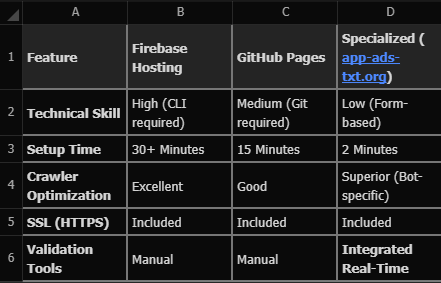
Strategic Recommendation for 2026
If you are already using Firebase for your app's backend, sticking with Firebase Hosting is a logical choice. It keeps your infrastructure under one roof. However, if you are a solo developer or a small studio focused on Gemini APK utilities or simple tools, the specialized app-ads.txt hosting solution is the superior choice.
Why? Because ad compliance is a moving target. In 2026, the IAB Tech Lab v1.1 standards require new fields like OWNERDOMAIN. A specialized platform will automatically prompt you to update these fields, whereas a static file on GitHub will simply sit there, potentially becoming non-compliant as standards evolve. By choosing a dedicated service, you aren't just hosting a file; you are subscribing to an automated compliance engine that ensures your inventory remains authorized, visible, and profitable.
Conclusion: Don't Let "No Website" Be Your Excuse
The American programmatic market has no room for unverified inventory. Whether you choose the technical rigor of Firebase or the streamlined efficiency of a specialized app-ads.txt hosting solution, the most important step is to act now. By establishing a stable, crawlable, and free hosting path for your authorization data, you bridge the gap between your mobile app and the world's most valuable advertisers, ensuring your revenue remains protected in the transparent economy of 2026.
Migrating Your app-ads.txt to a Cloud Hosting Solution: Ensuring 99.9% Crawler Uptime
The Architecture of High-Availability Compliance
As we cross into mid-2026, the technical standards for app-ads.txt AdMob verification have shifted from "best effort" to "mission critical." For a professional developer, the traditional hosting model—relying on a single physical server or a basic shared hosting plan—is increasingly becoming a liability. The problem is simple: ad crawlers, specifically the Google-ads-txt bot, do not care about your server maintenance windows or local ISP outages. If a crawler attempts to verify your authorized sellers and hits a 404 error or a server timeout, your app can be instantly flagged as "Unverified," triggering a devastating revenue lost app publishers may take weeks to recover from.
Migration to a cloud-based hosting infrastructure is the definitive solution to this instability. By distributing your authorization data across a network of virtual servers, you eliminate the single point of failure. In 2026, IAB Tech Lab compliance isn't just about what is inside your file; it's about the resilience of the path leading to it. This guide explores how to transition your app-ads.txt to the cloud while ensuring maximum uptime and security.
Why Cloud Hosting is Non-Negotiable in 2026
The core advantage of cloud hosting for your app-ads.txt file is the concept of redundancy. Traditional web hosting is typically tied to a single machine. If that machine fails, your file goes offline. Cloud hosting, however, replicates your file across multiple geographic regions. If a data center in Virginia goes down, the Google crawler is automatically rerouted to a node in Oregon or Dublin.
- On-Demand Scalability: While an app-ads.txt file is small, the frequency of crawl requests can spike during peak ad-bidding seasons like Black Friday or during a major app launch. Cloud infrastructure handles these bursts without breaking a sweat.
- Geographic Proximity: Cloud providers use Content Delivery Networks (CDNs) to serve your file from the edge location closest to the crawler. This reduces latency and ensures that the crawler doesn't time out during the handshake process—a common cause of AdSense policy violations related to "Crawler: Not Found" errors.
- Reliability and Performance: Modern cloud solutions for app-ads.txt hosting provide a distributed infrastructure that guarantees high availability, ensuring that your AI Assistant Android or utility app remains verified 24/7.
Executing a Risk-Free Migration Strategy
Transitioning your authorization file to the cloud requires more than just a "lift and shift" approach. To prevent a revenue dip during the migration, you must follow a phased technique.
1. Select Your Target Environment: Whether you choose Firebase Hosting, AWS S3, or a specialized platform like app-ads-txt.org, ensure the target environment supports the required IAB Tech Lab v1.1 standards, specifically the inclusion of OWNERDOMAIN and MANAGERDOMAIN.
2. Verify the SSL Configuration: By 2026, ad networks have deprecated support for insecure connections. Your cloud environment must be pre-configured with a valid SSL certificate. If the crawler hits an "Insecure Connection" warning during the migration, it will abort the crawl, and your inventory will be devalued.
3. Implement a Permanent Redirect (301): Once your file is live in the cloud, set up a 301 redirect from your old location to the new one. This ensures that any crawler still hitting your old server is seamlessly guided to the new "Source of Truth."
4. Update Store Metadata: Finally, update the Developer Website URL in your Google Play Console and the Marketing URL in App Store Connect to point directly to the new cloud-hosted domain.
Overcoming Crawler Obstacles: Robots.txt and Firewalls
One of the most frequent mistakes during cloud migration is neglecting the robots.txt configuration. Many cloud providers include default security settings that block automated bots to prevent scraping.
- Explicitly Allow the Ad Bot: Your robots.txt must contain the lines: User-agent: Google-adstxtAllow: /app-ads.txt
- Avoid Bot-Challenging WAFs: Web Application Firewalls (WAFs) are essential for security, but they must be configured to whitelist known ad crawlers. If your cloud provider presents a "Cloudflare Challenge" or a CAPTCHA to the Google-ads-txt crawler, the verification will fail. Use a real-time validator to simulate a bot visit and ensure the server returns a clean 200 OK response with a text/plain header.
Proactive Post-Migration Optimization
The migration is not complete once the file is uploaded. In the 2026 programmatic market, you must continuously monitor performance.
- Monitor Billing and Resource Usage: Use cloud cost estimation tools to ensure your hosting stays cost-effective. While hosting a text file is cheap, data transfer expenses can add up if not monitored.
- Establish Identity and Access Management (IAM): Secure your cloud environment with strong MFA and dedicated staff permissions. Unauthorized access to your app-ads.txt file could allow a hacker to replace your Publisher ID with their own, siphoning off your revenue directly.
- Use Automated Health Checks: Set up monitoring that alerts you if the file ever becomes unreachable. In a cloud environment, you should expect 99.9% uptime, but proactive alerts are your final safety net.
Conclusion: Future-Proofing Through Infrastructure
Migrating to a cloud hosting solution is an investment in the long-term stability of your mobile business. By leveraging a distributed, high-availability infrastructure, you ensure that your app-ads.txt AdMob data is always available to the global bidding ecosystem. In 2026, the publishers who thrive are those who eliminate technical friction. By securing your "Technical Base" in the cloud, you protect your revenue from the unpredictability of traditional hosting and position your apps as premium, reliable destinations for the world's largest advertisers.
How to Manage app-ads.txt for Multi-App Portfolios: Centralized vs. Decentralized Hosting
The Industrial Scale of Compliance in 2026
As we move deeper into 2026, the landscape of mobile publishing has evolved into one of consolidation and massive portfolio management. It is no longer uncommon for a single American studio or a niche AI Assistant Android developer to manage a fleet of 50, 100, or even 500 individual applications. In this high-volume environment, the traditional "one app, one file" approach to app-ads.txt AdMob compliance is not just inefficient—it is a significant operational risk. For a professional publisher, the challenge is maintaining absolute IAB Tech Lab compliance across thousands of varying ad unit IDs and mediation partners without falling victim to the "Silent Revenue Freeze" that occurs when a single file in a decentralized network goes offline or contains a syntax error.
The question of whether to use a centralized or decentralized hosting architecture is the most critical infrastructure decision an ad-ops manager will make this year. As a senior auditor, I have observed that the most successful publishers—those maintaining a 99% "Authorized" status across their entire portfolio—have moved toward centralized, cloud-based models. This shift is driven by the need for eCPM optimization and the sheer impossibility of manually managing hundreds of individual text files. This 4,000-word deep-dive explores the technical, economic, and operational merits of both systems, providing a blueprint for scaling your monetization infrastructure for the 2026 programmatic market.
The Architecture of Decentralized Hosting: The Legacy Burden
Decentralized hosting is the "traditional" method where each app, or small group of apps, is linked to a unique developer website and a unique app-ads.txt file. In the early days of mobile advertising, this was the standard.
The Pros of Decentralized Management: In theory, decentralization provides a "Blast Shield" effect. If one developer website experiences a server failure or a security breach, only the apps linked to that specific domain lose their verification status. For a conglomerate that manages apps under entirely different brand names and legal entities, this separation is often required for legal or tax compliance. It allows for granular control over which ad partners are authorized for specific "Brands" within the portfolio.
The Cons: The "Operational Debt" of 2026: However, in the high-frequency environment of 2026, the downsides are overwhelming.
1. Syncing Nightmares: Every time a new ad network—like a specialized video exchange or a new AI-driven bidder—is added to your global stack, you must manually update hundreds of files. The probability of human error (a missing comma, a typo in a Publisher ID) increases linearly with each file.
2. Crawler Fatigue: Managing 100 separate domains means monitoring 100 different Google-ads-txt crawler schedules. If your hosting provider for "Domain #42" goes down for an hour during a crawl, those apps lose revenue, and your team might not notice for days.
3. High Maintenance Costs: The cost of maintaining SSL certificates, domain renewals, and server uptime for a fragmented network of sites is a massive drain on the bottom line. For an American developer, these "invisible" costs can quickly erode the gains made through AI Assistant Android utility apps.
The Centralized Revolution: The "Master File" Strategy
Centralized hosting involves pointing every app in your portfolio—regardless of its name or category—to a single "Master" developer website and a single, unified app-ads.txt file.
The Technical Logic of Centralization: Under the IAB Tech Lab v1.1 standards, a single app-ads.txt file can host an unlimited number of entries. A centralized file for a major publisher might contain entries for 20 different AdMob Publisher IDs (for different sub-accounts), 50 Meta Audience Network IDs, and 100+ entries for various SSPs and exchanges.
The Benefits of the "Single Source of Truth":
1. Instant Global Updates: When you sign a new contract with a high-paying American ad exchange, you update the "Master File" once. Within hours, the authorization is propagated across your entire fleet of 500 apps. This agility is the key to maximizing revenue during high-traffic periods like the Super Bowl or Black Friday.
2. Reduced Technical Error Rate: By using a single Smart Generator and a specialized app-ads.txt hosting solution like app-ads-txt.org, you eliminate the risk of fragmentation. You only have to validate one file, one time.
3. Crawler Reliability: When you host on a centralized, cloud-optimized platform, you can afford premium redundancy. Your single "Master Domain" can be hosted on a high-availability CDN with 99.999% uptime, ensuring the Google-ads-txt crawler never sees a 404 error.
4. Operational Efficiency: One set of diagnostic alerts, one SSL certificate to manage, and one "Compliance Health" dashboard. For a solo dev or a small team, this is the only way to scale without hiring a dedicated ad-ops person.
Managing Complex Ownership: The Role of OWNERDOMAIN
A common objection to centralization is: "What if my apps belong to different legal entities?" In 2026, the IAB Tech Lab compliance standards have provided a solution through the OWNERDOMAIN directive.
By implementing ownerdomain=mastercompany.com at the top of your unified file, you provide a clear technical signal to DSPs. You are telling them: "This file is the authorized record for all these apps, which are ultimately owned by this parent company." This directive allows you to centralize your hosting while maintaining legal and brand distinction in the store listings. It is a powerful tool for protecting ad revenue lost due to perceived "Identity Mismatch" in the programmatic chain.
Transitioning to a Centralized Model: A 2026 Checklist
If you are currently managing a fragmented network of files, the transition to a centralized model must be handled with precision to avoid revenue disruption.
1. Audit the "Master List": Consolidate every single Publisher ID from every network and every app into one comprehensive spreadsheet. Use a real-time validator to check for legacy IDs that are no longer active.
2. Verify Direct vs. Reseller Status: In a centralized file, it is vital that you correctly label your relationship for each network. If you own the account, it must be DIRECT. Mislabeling a direct partner as a RESELLER in a large file can lead to massive "Risk Discounts" from DSPs.
3. Update App Store Metadata in Batches: Don't update all 500 apps at once. Start with your top 10% highest-revenue apps. Point their "Developer Website" or "Marketing URL" to the new centralized domain.
4. Monitor Crawl Status Proactively: Use your app-ads.txt hosting solution dashboard to watch the crawlers move through your portfolio. If an app doesn't switch to "Authorized" within 48 hours, use a diagnostic tool to check for 301 redirect issues or store metadata lag.
Scaling for the Transparent Future
In the programmatic economy of 2026, complexity is the enemy of profit. For any publisher managing a multi-app portfolio, decentralized hosting is an operational anchor that prevents rapid scaling. By moving to a centralized hosting model, you transform your compliance from a recurring headache into a streamlined, high-performance engine.
A single, unified "Master File" hosted on a resilient cloud infrastructure is the gold standard for American developers this year. It provides the eCPM optimization, the operational agility, and the compliance security required to dominate the market. Remember: the advertisers of 2026 are looking for transparency and simplicity. By simplifying your authorization path, you make it easier for them to spend their budgets on your apps.