App Monetization
Comprehensive guides for mobile app monetization: platform selection, integration strategies, and app-ads.txt compliance for maximizing ad revenue.
IAA Monetization Complete Guide (2026 Latest Edition): Platforms, Integration, Requirements & Practical Roadmap
As mobile internet traffic grows increasingly costly, IAA (In-App Advertising) has become one of the most stable and scalable monetization methods for developers worldwide.
Many newcomers think:
"Simply integrating AdMob is enough to make money."
But the reality is:
IAA monetization = Product × Traffic × Ad Strategy × Technical Architecture
This guide breaks down everything from scratch:
- Top mainstream IAA ad platforms (with sign-up links)
- Real entry barriers and features of each platform
- Technical integration & core architecture
- Preparations for beginners
- Optimized step-by-step implementation roadmap
I. Underlying Logic of IAA Monetization (Must-Know Basics)
IAA is far more than just registering for ad platforms — it is a complete operational system:
End Users (Traffic)
↓
Your Mobile App (Product)
↓
Ad SDKs (From various platforms)
↓
Mediation Systems
↓
Ad Networks (AdMob, AppLovin, etc.)
↓
Advertisers
Key Takeaway
You are not just "earning money via ad platforms" — you are monetizing users' attention.
II. Tier 1 Platforms (Mandatory Integration)

1. AdMob (Google)
Official Link: https://admob.google.com
Supported Formats
- Mobile Apps: Full ad suite on AdMob
- Web Pages (H5): AdSense
Ad Types
- Banner Ads
- Interstitial Ads
- Rewarded Video Ads
Integration
- Android SDK & iOS SDK available
- Developer Docs: https://developers.google.com/admob
Review Requirements (Extremely Strict)
- App must be published on Google Play or App Store
- A dedicated privacy policy page is mandatory
- No prohibited or borderline content
Pros
- Industry-leading fill rate
- Global coverage
- Top choice for beginners
Risks
- Account bans happen easily for violations
- Strict rules for content and traffic quality
Prerequisites
- A publicly released app
- Fully compliant content
- Complete privacy policy
2.AppLovin
Sign-up Link: https://dash.applovin.com/signup
Core Product
- MAX (Ad Mediation Platform)
- Specialized in video ads (rewarded videos)
Integration Docs: https://developers.applovin.com
Review Requirements
- Minimum 1,000 new daily installs for 7 consecutive days
- Higher approval odds with Tier 1 (Western) users
- App must be live on app stores
Pros
- Impressive eCPM, especially for Western markets
- Best performance for game monetization
Notes
- Low revenue for low-traffic apps
- Requires a steady user acquisition pipeline

3.ironSource
Official Link: https://platform.ironsrc.com
Positioning
All-in-one ad platform + mediation system
Supported Ad Types
- Rewarded videos & interstitial ads
- Built-in ad mediation
Pros
- Excellent for game monetization
- Powerful ad scheduling capabilities
Notes
- Primarily manual review process
- Requires a genuine live project
III. Tier 2 Platforms (Fill Ad Inventory & Boost Revenue)
4.Chartboost
Sign-up Link: https://platform.chartboost.com/signup
- Requirement: 250+ DAU for 7–14 days
- Features: Optimized for game ads; less friendly to low-traffic projects

5.InMobi
Sign-up Link: https://publisher.inmobi.com/signup
- Features: Lenient review rules; ideal for filling ad inventory
###
6.Vungle (Liftoff)
Sign-up Link: https://app.vungle.com/signup
- Features: Top-tier video ad performance; a live app is required for access
7.Mintegral
Sign-up Link: https://dev.mintegral.com/user/signup
- Requirements: 10,000+ total downloads; business entity registration
- Features: Strong presence across Asia-Pacific markets

8.Pangle (ByteDance)
Official Link: https://www.pangleglobal.com
- Features: Tied to the TikTok ecosystem; great performance in Southeast Asia
IV. Tier 3 Platforms (High-Threshold Inventory Supplements)
Digital Turbine (Formerly Fyber)
Developer Docs: https://developer.digitalturbine.com
- Requirement: 30,000+ DAU

Fyber
Official website: https://developer.digitalturbine.com
*(Now owned by Digital Turbine)*
BIGO Ads
- Requirements: 5,000+ DAU + registered business entity
Yandex Ads
- Best suited for Russian-speaking markets
Unity Ads
Official Link: https://unity.com/ads
- Focus: Game-focused ad platform, dominated by rewarded videos
- Features: Leading performance within the Unity ecosystem; a must-have for game developers
- Requirements: Game apps are prioritized; easier approval for projects built with Unity Engine
- Best For: Mobile games & hyper-casual games
- Notes: Low returns for utility apps; not recommended for non-game products
Amazon Publisher Services (APS)
Official Link: https://aps.amazon.com
- Core Technology: Header Bidding
- Supports both web and app traffic
- Features: Access to Amazon’s ad demand; effective for raising overall eCPM
- Best For: Mid-to-large scale developers with existing traffic
- Notes: High entry barriers; not recommended for beginners
V. Core Technical Requirements (The Biggest Bottleneck for 90% of Developers)
- SDK Integration (Mandatory) Separate Android and iOS SDK integration for every ad platform.
- Mediation (Strongly Recommended) Recommended options: AppLovin MAX or ironSourceWhy use mediation? It automatically selects ads with the highest bid price, lifting total revenue by 20% to 100%.
- app-ads.txt (Mandatory)Functions: Prevent ad fraud and improve revenue.Deployment Path:
shturl.cc/KrCRQyIuSdWwmOGqg6xO7niBF
VI. Core Prerequisites You Need
Most developers get stuck at these points:
- A Live App (Top Priority) No app = no monetization possible.
- User Acquisition Capability Reliable channels: Facebook Ads, TikTok Ads
- Technical Know-how Basic ability to integrate SDKs, or access to a development team.
- Compliance Management Non-compliance will lead to immediate AdMob account suspension.
VII. Optimized Implementation Roadmap (Actionable)
- Build your app Recommended categories: Utility tools (cleaners, battery tools, AI tools) | Casual mobile games
- Integrate ad platforms Start with: AdMob + AppLovin
- Drive traffic via paid ads Primary channels: Facebook, TikTok
- Optimize revenue Add ironSource / MAX for ad mediation
VIII. Core Profit Logic of IAA Monetization (Key Takeaway)
Ad platforms do not determine your revenue. Your earnings depend entirely on:
Traffic × User Retention × Ad Placement Strategy
Example Calculation DAU = 10,000 Average ad views per user per day = 5 Average eCPM = $10 Estimated Daily Revenue ≈ $500
IX. Most Profitable Niches (Practical Advice)
1.Utility Apps (Highly Recommended 🔥)
AI tools, system cleaners
- Pros: Easy development + strong market demand
2.Casual Mobile Games
Endless runners, tap-to-play games
- Pros: High ad view frequency
3.Interactive & Companion Apps (Emerging Trend)
AI chatbots, virtual companion apps
- Pros: Excellent user retention
X. Conclusion
✔️ IAA monetization is not simply "integrating ads for profit". The full logic:
Acquire users via your product → Monetize user traffic through in-app ads
✔️ Critical Tip for Newcomers Do not integrate dozens of ad platforms at once.
✔️ Follow this proven workflow:
- Launch a simple app
- Integrate 2 ad platforms
- Achieve positive ROI
- Scale your business step by step
✔️ Overview of IAA Platform Types & Functions
▶️ 1. Ad Demand Platforms (Direct Revenue Sources)
▶️ 2.Mediation Platforms (Core Profit Layer 🔥)
▶️ 3.Bidding / Exchange Platforms (Advanced Strategies 🔥)
▶️ 4.Fill / Regional Platforms
The entire IAA ecosystem boils down to three core components:
- Ad Networks: Generate revenue
- Mediation: Allocate traffic
- Bidding Systems: Lift ad prices
Profitable IAA monetization is never about integrating a single ad platform. Instead, you let multiple networks compete against each other to drive up your earnings.
App Monetization: How App‑ads.txt Helps Developers Fight Ad Fraud & Boost eCPM
In programmatic advertising, adding app‑ads.txt is a common requirement for developers. It lets you better control which channels serve ads in your app, while also making your inventory a trusted sour...
1. What is App‑ads.txt?
Short for *Authorized Digital Sellers for Apps*, app‑ads.txt is an anti‑fraud standard developed by the IAB Tech Lab. Its purpose is to prevent unauthorized traffic sales, bringing transparency and trust to mobile app advertising.
Put simply: app‑ads.txt acts like a “seal of approval” that guarantees the quality of your ad sources.
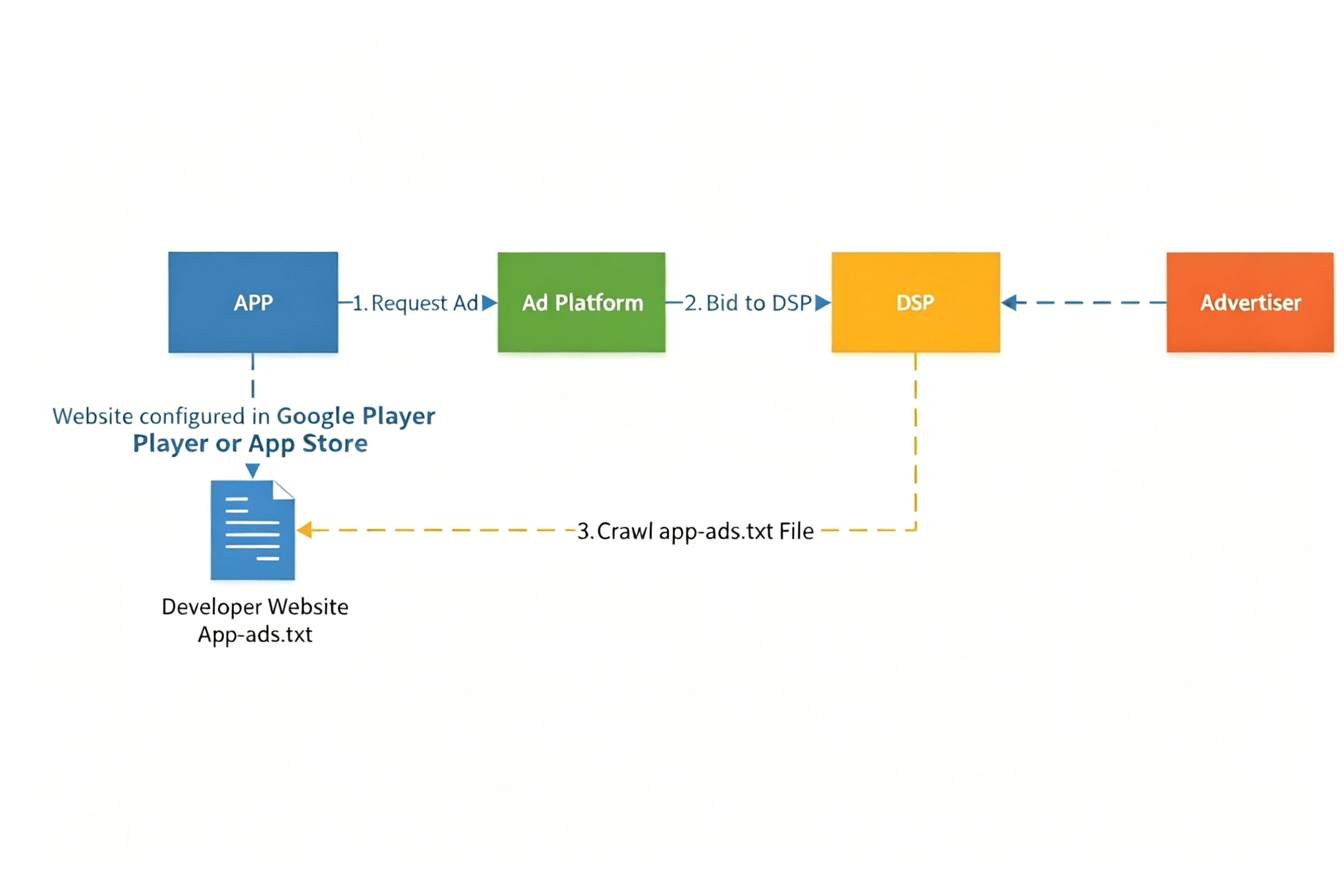
How It Works?
- Your app requests an ad from an ad network.
- The ad network sends a bid request to DSPs.
- Before a DSP bids on your inventory, it scans the
app‑ads.txtfile hosted on your developer website to verify which ad networks are authorized to sell your traffic. The DSP then decides whether to accept bids only from the sources listed in the file.
According to 42 Matters data, top‑performing apps have a much higher app‑ads.txt adoption rate than the overall app ecosystem, setting a new standard for transparency and security in mobile advertising:
- On the Google Play Store: 68.7% of the top 1,000 apps use app‑ads.txt.
- On the Apple App Store: 42.4% of the top 1,000 apps use app‑ads.txt.
2. Key Benefits of App‑ads.txt
The app‑ads.txt file is publicly hosted, so it can be crawled by ad exchanges, supply‑side platforms (SSPs), buyers, and third‑party agencies.
For Advertisers
Brands demand higher‑quality, verified traffic. Advertisers working with app‑ads.txt‑compliant platforms can transact with confidence, knowing their budgets won’t be wasted on fraudulent impressions.
For Developers
- Higher eCPM: Major DSPs like Google Ad Manager, Verizon Media, and Amazon Advertising will *not fill ad requests* from apps without app‑ads.txt. Without bids from these buyers, competition for your traffic drops, directly lowering your eCPM.
- Reduced Ad Fraud: Many illegitimate apps inflate ad inventory with fake impressions, clicks, downloads, and installs to steal advertiser budgets. App‑ads.txt effectively blocks this activity, creating a fairer market for legitimate developers.
- Lower Risk of Blacklisting: Verified apps are far less likely to be flagged or banned. All developers should implement app‑ads.txt to protect their ad inventory and unlock higher revenue from advertisers targeting verified traffic.
3. How to Set Up App‑ads.txt
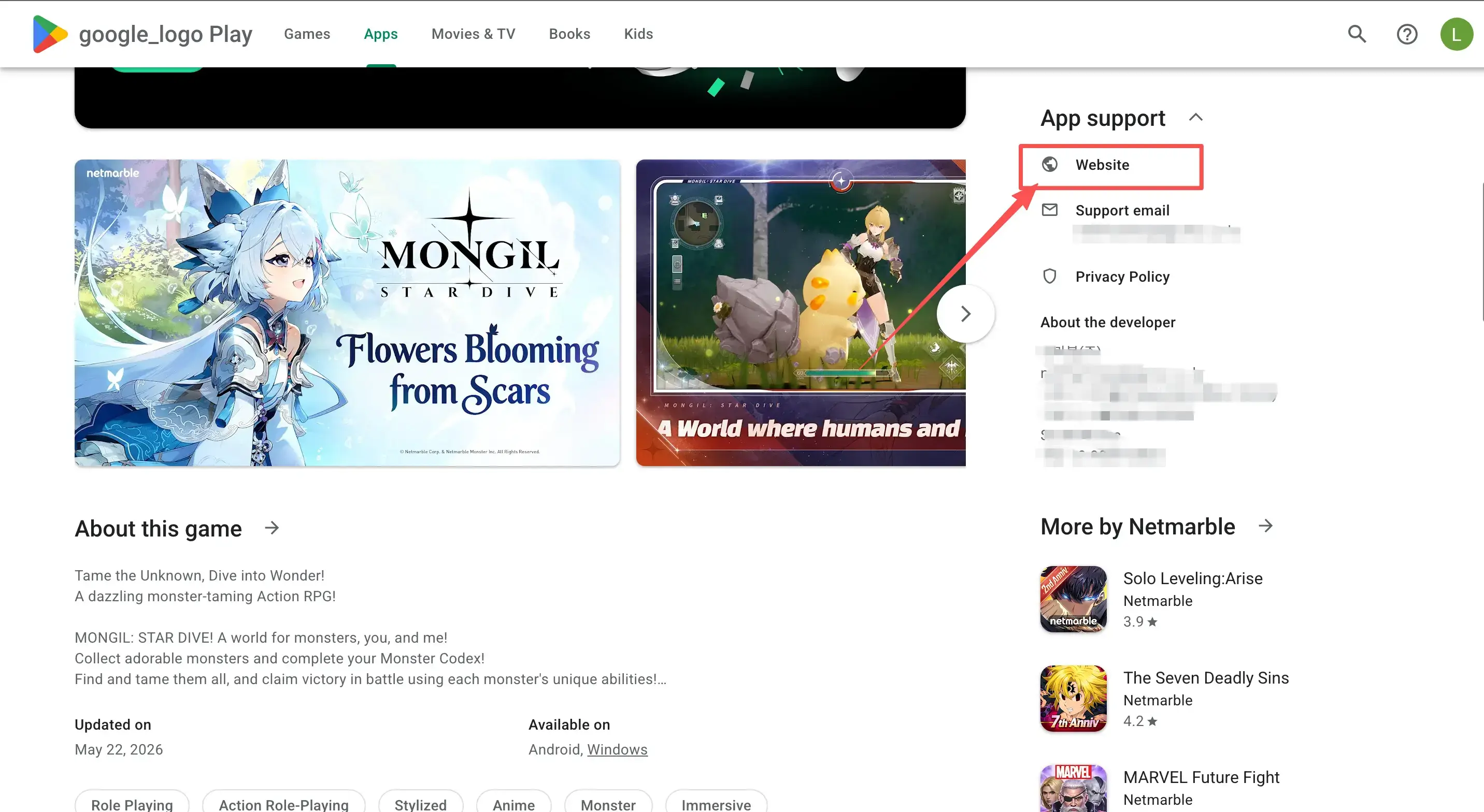
- Add your developer website to your app store listing. The developer website lets users learn more about your app — and crucially, it’s how ad platforms verify you own the app. Link your site in your Google Play or App Store listing so that AdMob and other networks can confirm ownership.
- Create and host your
app‑ads.txtfile. Place the file in the root folder of your developer website (e.g.,https://yourdomain.com/app‑ads.txt), and list all authorized sellers. Contact every ad network you use in your app to get the exact lines you need to add to the file.
Overseas Programmatic Traffic Monetization — app-ads.txt / ads.txt
In programmatic advertising, many developers are required to implement app-ads.txt, but what exactly does this file do, and what is its purpose?
First, let’s clarify what app-ads.txt and ads.txt are. These are text files where developers list their authorized buyers of ad inventory, hosted on the root domain of their product’s website. The file serves two core purposes:
- It verifies whether the developer works with SSPs/ad networks directly or indirectly.
- Upstream, it ensures traffic traceability and security; downstream, it validates the budget source, proving that the developer has explicitly authorized a specific SSP to sell their inventory.
The only difference between the two is scope:
app-ads.txtis for mobile apps.ads.txtis for web pages.
According to the IAB’s official definition, an app-ads.txt entry typically consists of 3 or 4 fields:Domain + Publisher ID + Relationship Type + Certification Authority ID (optional)
Example:google.com, pub-1234567890, DIRECT, f08c47fec0942fa0
Here’s the plain-English breakdown of each field:
- The canonical domain of the authorized advertising system (e.g.,
google.comif you monetize via Google). - Your Publisher ID on that platform (the unique ID assigned to you by Google).
- Your relationship with the platform:
DIRECT: You work directly with the platform.RESELLER: The platform buys your traffic through a third-party reseller (meaning you have a direct relationship with the reseller, not the platform itself).
- Certification Authority ID (optional): The platform’s unique, fixed ID verified by the Trustworthy Accountability Group (TAG).
A common scenario involves multi-level authorization: If you work with Platform B, you’ll add B’s DIRECT line. However, B may also require you to add a line for its partner, Platform C. This line for C would look like:C.com, [B’s Publisher ID on C’s platform], RESELLER, [C’s TAG ID]
Adding this line means you explicitly authorize B to resell your traffic to C, effectively granting C permission to sell your inventory on your behalf.
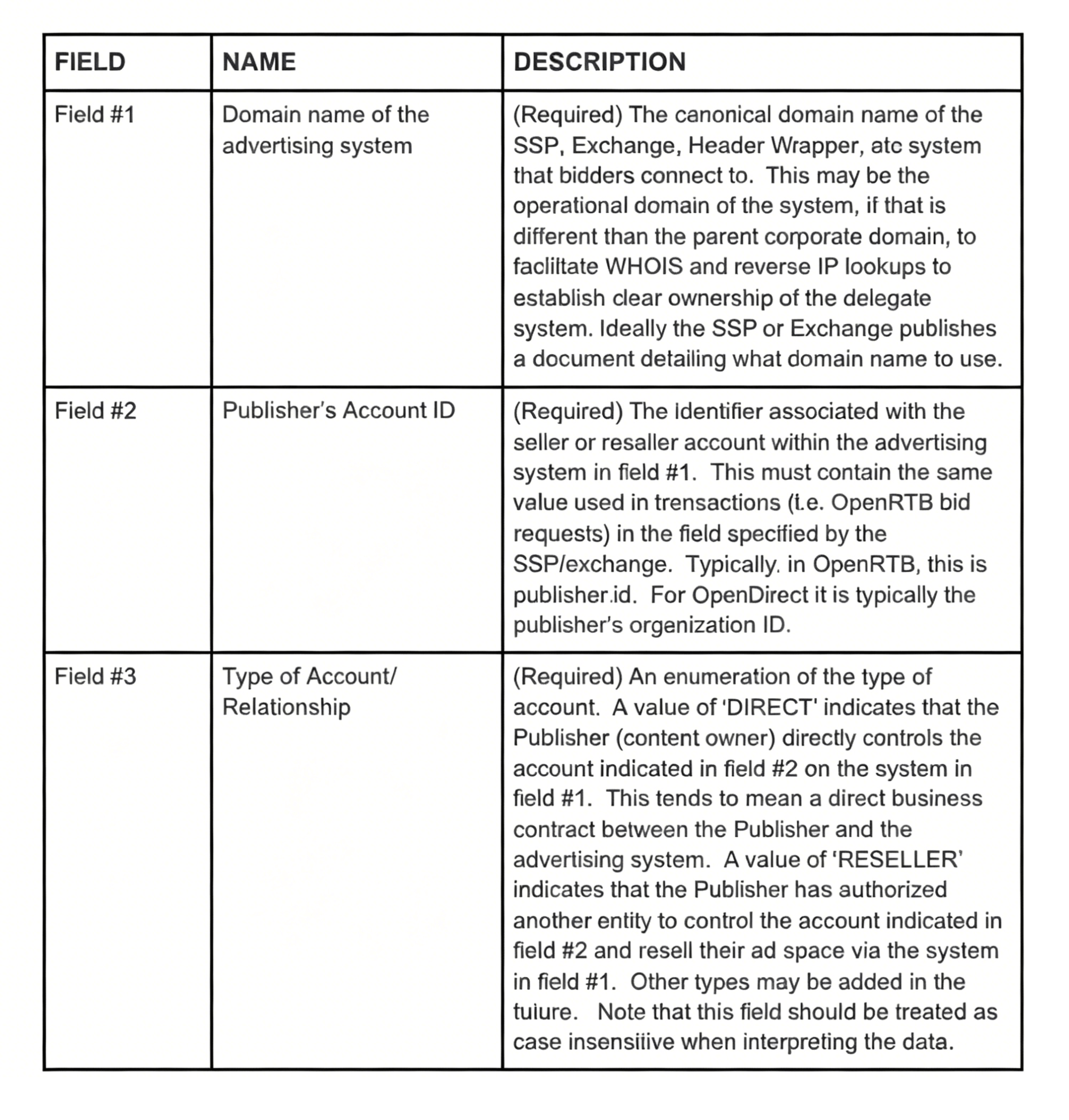
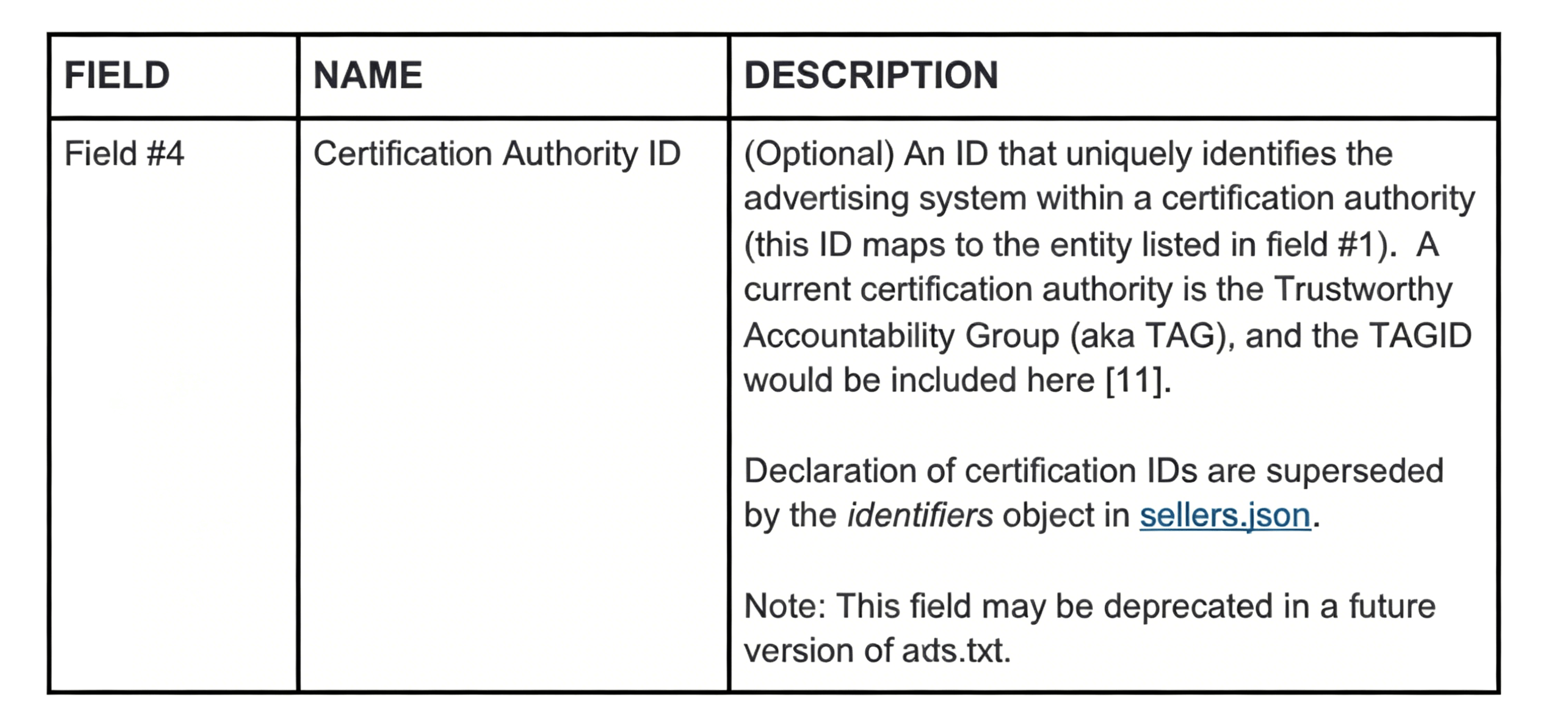
To put it simply, these fields show that app‑ads.txt helps demand‑side buyers verify the reliability of traffic coming from networks/SSPs. It lets them confirm whether the developer has a direct, controllable partnership with the SSP. Developers, in turn, understand why monetization platforms require this file: especially in programmatic brand advertising, there is a much higher demand for traffic traceability. Brands want to ensure their ads don’t appear on questionable apps — and this delivers measurable results.
So, how do ad platforms verify a developer’s app‑ads.txt implementation? As mentioned, brand advertisers demand full transparency, so they require the app‑ads.txt URL to be tied directly to the app’s official website, hosted as a sub‑file on the root domain. That official website must also match exactly the URL listed in the app’s Google Play or App Store listing.
For example, take a typical app:
- Open the app’s Google Play page, find the listed official website, and visit it.
- Navigate to the official website.
- Append
/app-ads.txtto the root domain URL.(https://www.XXXX.com/app-ads.txt) - The browser will automatically redirect to the
app-ads.txtURL.
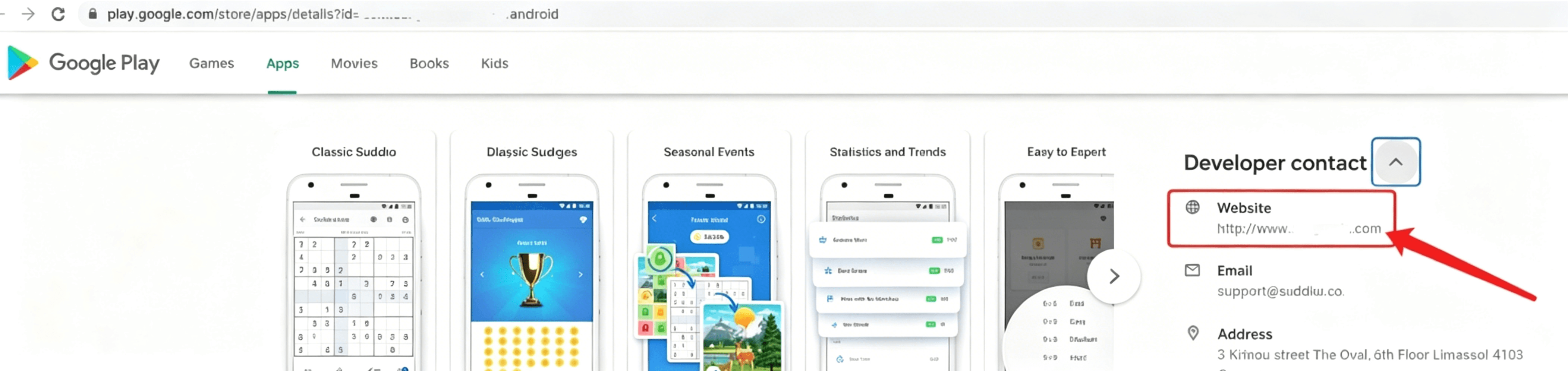
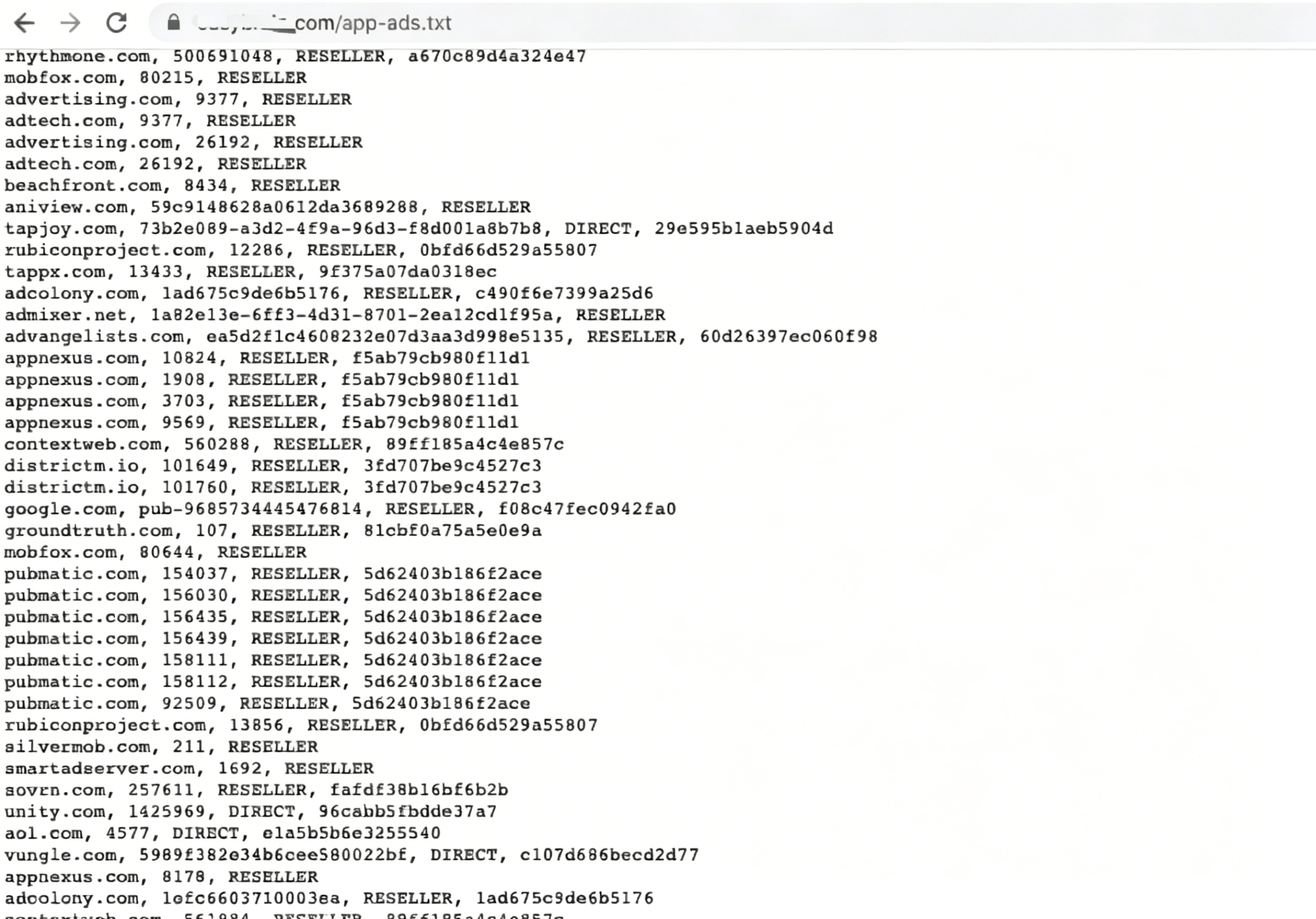
This completes the full traceability process. If a developer links their app store listing, official website, and app-ads.txt URL together, it strongly signals that their traffic is fully verifiable — something many developers struggle to achieve.
Of course, as more networks and SSPs emerge, relying solely on the developer’s authentication has become unreliable to some extent. Demand-side buyers have started requiring authorized traffic buyers to also host a corresponding file on their own root domain to document the source of the traffic, matching the information provided by the developer. This is the origin and definition of seller.json, which we’ll cover in the next article.
Will not adding app-ads.txt affect revenue?
The IAB Tech Lab assigns a unique ID to each ad platform. As developers, we obtain the corresponding IDs from every ad network we work with, then publish them publicly via the official website linked ...
What happens if you skip app-ads.txt?
From my real-world experience: With Unity Ads, my revenue was just a few cents per day before adding the file, and it jumped to several dollars afterward. I saw barely any changes with Google AdMob, where earnings stayed roughly the same. Even so, getting this set up properly will give you complete peace of mind.
How to set it up?
App-ads.txt is simply a plain text file. Create a new text document on your computer and rename it to app-ads.txt. Then add content to the file following the standard format below:
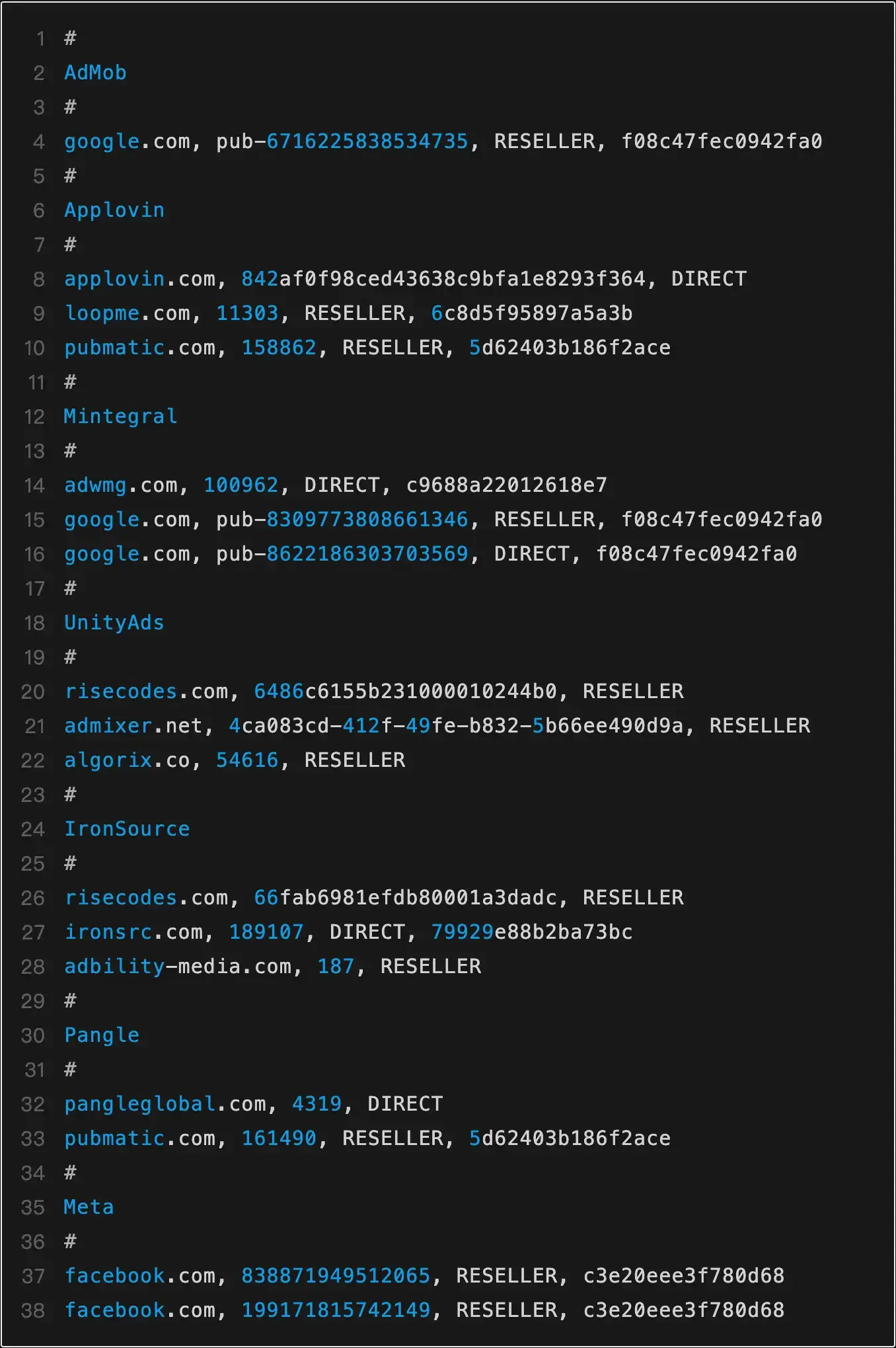
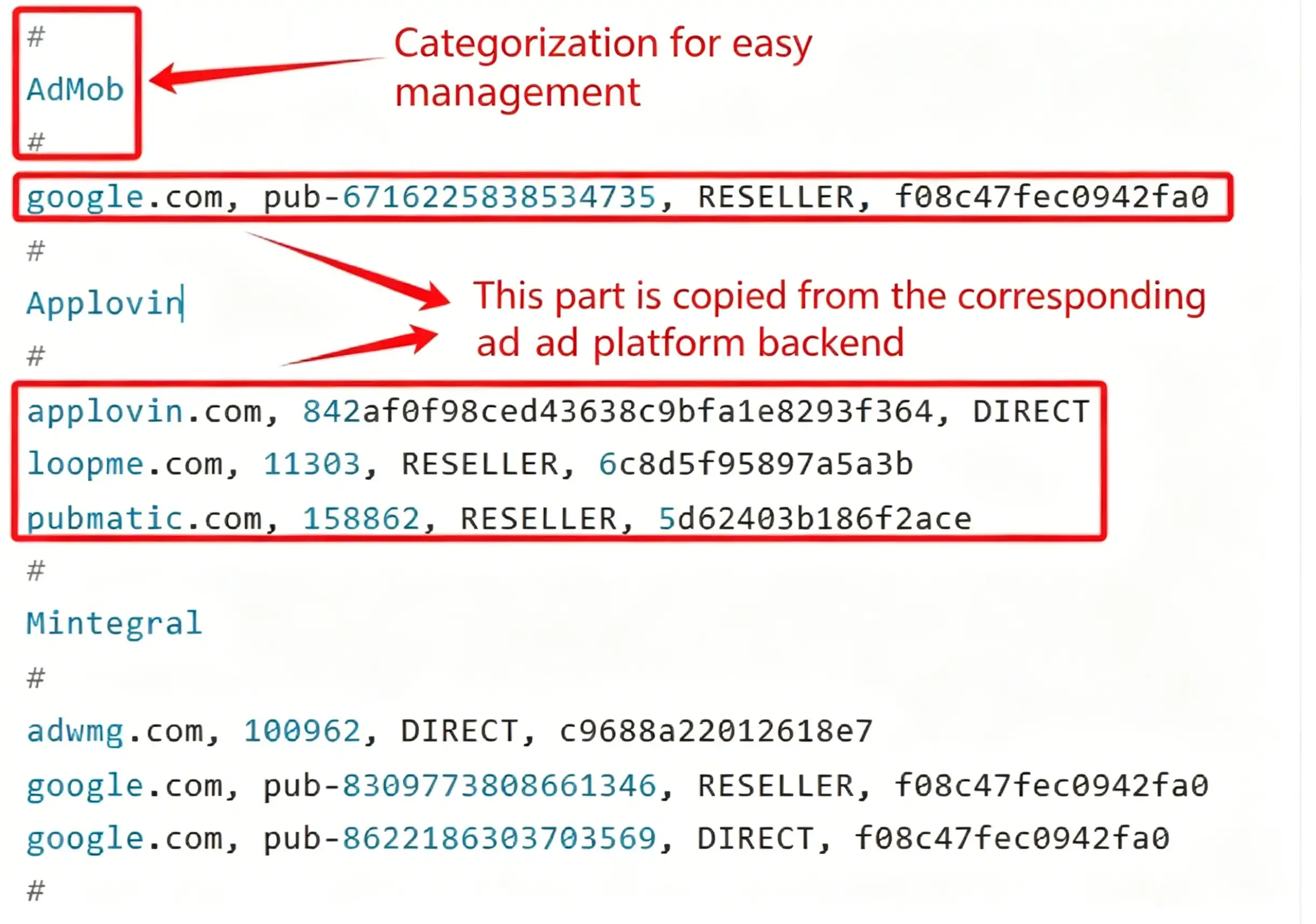
###
Where to get the content for app-ads.txt?
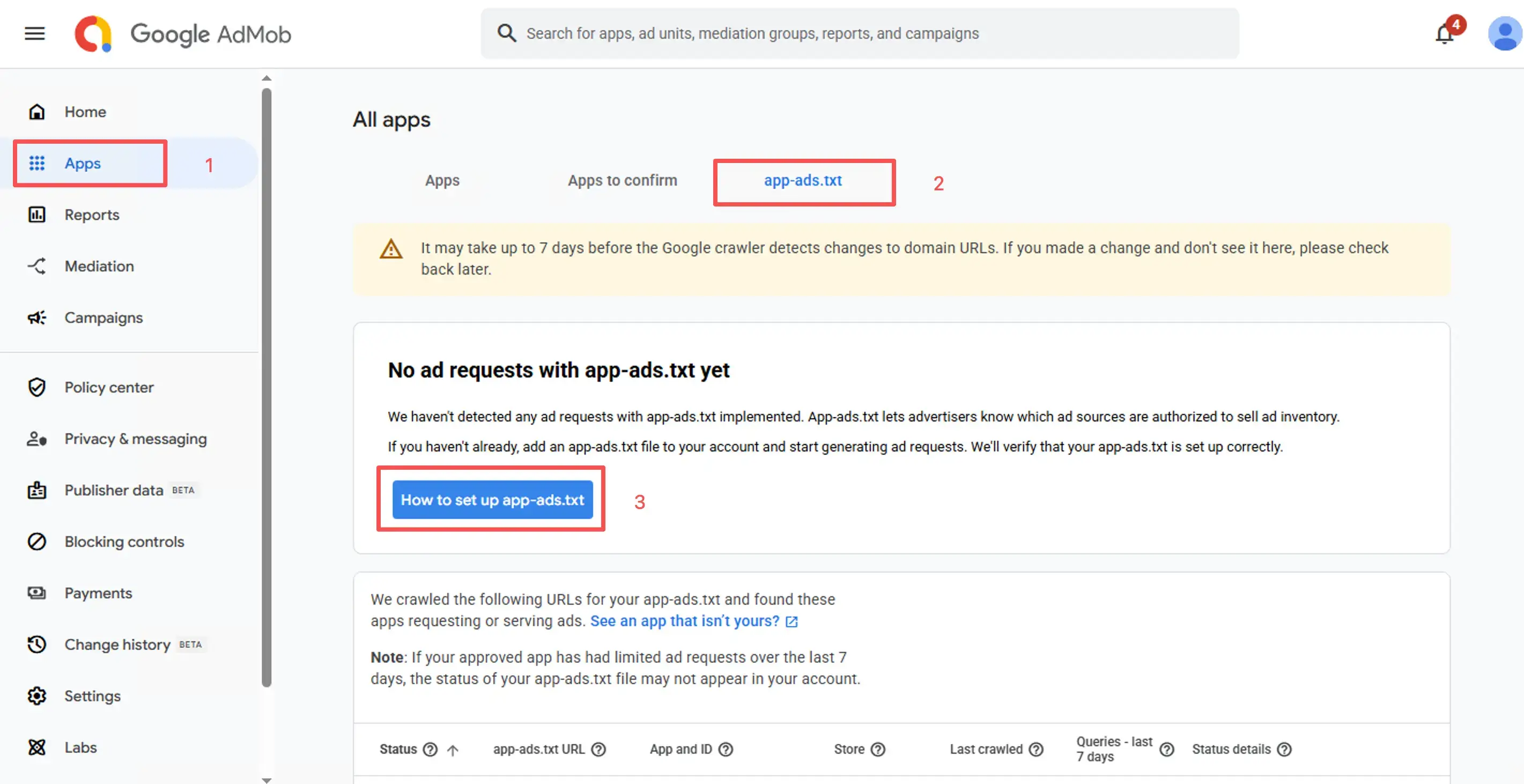
Take AdMob as an example. As shown in the screenshot: Go to your AdMob dashboard > Apps > All apps > app-ads.txt. You can find the content here and copy it directly.
AppLovin: On the left sidebar of the dashboard, go to Account > app-ads.txt.
Unity Ads: From the left sidebar, navigate to Unity Ads Monetization > Organization Settings > app-ads.txt.
Mintegral: On the top navigation bar, select App Settings > app-ads.txt.
Facebook: You can find the relevant content under Integrations > Assets while creating assets and ad placements. Alternatively, locate the numeric ID after business_id= in your browser address bar, then insert this ID into the format provided below.

IronSource: It works differently. You need to contact their support representative to obtain the required content.
Pangle: Locate your Account ID in the dashboard, then replace the placeholder "Account ID" in the template. The second line remains unchanged.

Once you finish filling in all the content, upload the app-ads.txt file to the root directory of your website.
Does this mean you need to build a full website? It sounds troublesome. Plus, domain names and web servers cost money, adding extra expenses. That’s true. Therefore, we will use a third-party hosting service for the site. We’ll cover website hosting in a separate post.
App-ads.txt Don't miss out on Revenue
Every time you integrate a new ad source, the provider will always remind you not to forget to add their entries to your app-ads.txt. So why is this file so important?
What is App-ads.txt?
Think of app-ads.txt as a long list. What does it contain? The list names all the authorized sellers the developer has approved. Everyone on this list has permission to sell the developer’s ad inventory.
What is the purpose of App-ads.txt?
In my view, there are three key stakeholders affected by App-ads.txt: developers, DSPs, and advertisers.
- Developer: The owner of the app.
- DSP: Short for *Demand Side Platform*. Simply put, this is the platform used to buy and serve ads.
- Advertiser: The entity that pays to run ads.
App-ads.txt acts as a common thread connecting all three parties.
Developers add the app-ads.txt file to their website, and list that website in their app store or Google Play listing. The goal is to explicitly authorize which parties are allowed to sell their ad inventory, preventing bad actors from impersonating their ad units to sell traffic — and thus avoiding lost revenue. That income rightfully belongs to the developer, not to scammers who fabricate fake ad placements.
DSPs use the App-ads.txt file to signal to advertisers that the inventory they sell is authorized, purchased through legitimate channels. This reassures advertisers that their ad spend is secure, and that their money is going to real, verified inventory rather than being wasted.
For advertisers, app-ads.txt confirms their budget is going to the right place — directly to the app developer, not to fraudsters. Why does this matter? Misspent budget not only wastes money, but also delivers poor-quality users, hurting campaign performance.
app-ads.txt File Breakdown
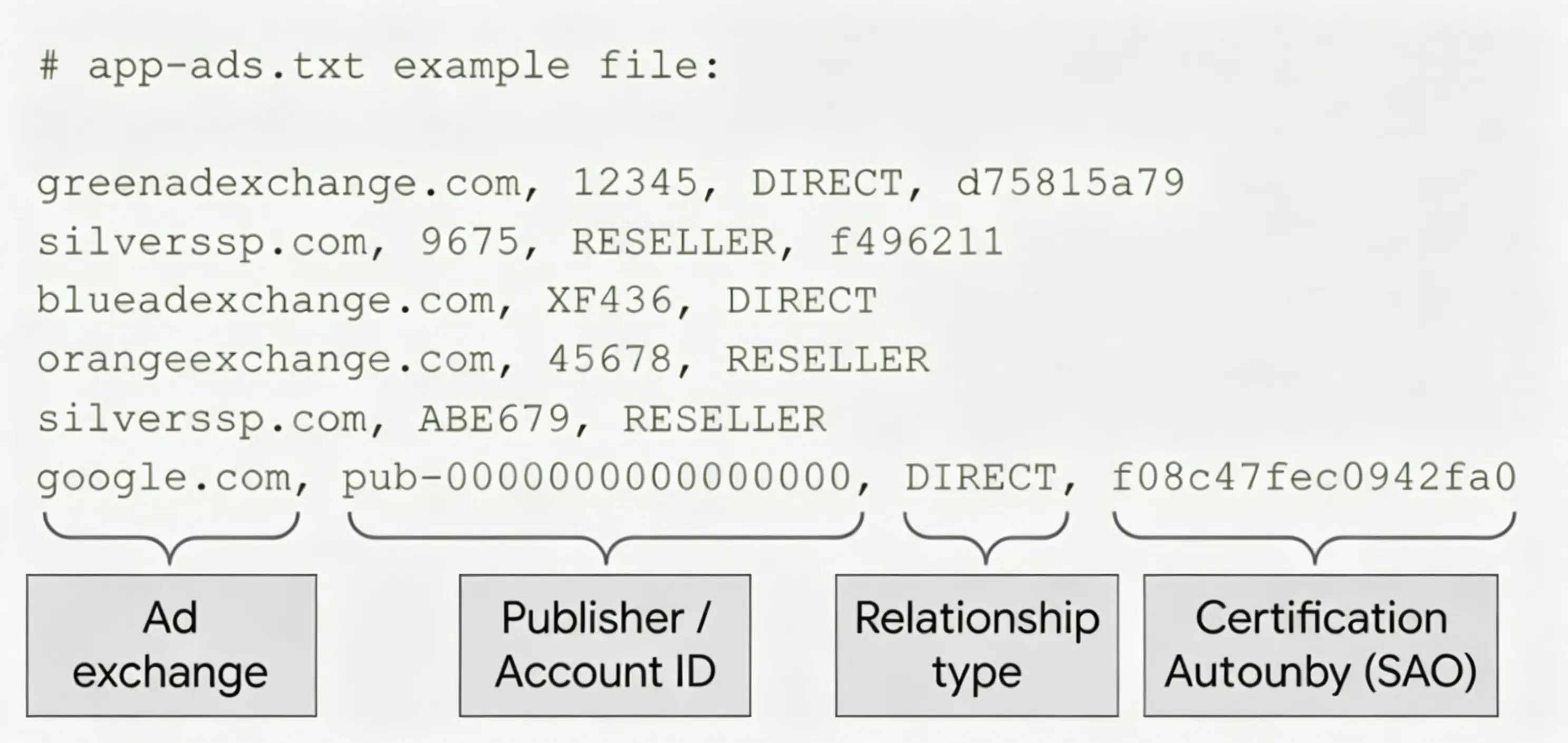
*Image source: Google*
- Ad Source Domain: Taking Google as an example, the domain is
google.com(note: standard entries omit thehttp://prefix). - Publisher ID / Account ID: These IDs can be found in your respective ad monetization accounts.
- Relationship Type:
directorreseller - Ad Source TAG ID: A unique identifier for the ad network. For example, Google’s TAG ID is
f08c47fec0942fa0.
💡 Note: In app-ads.txt, the domain is always written without http:// or https://, which is why I’ve simplified the example here.
Key app-ads.txt Resource Compilation
Below is AdMob’s definition (official link):
1. Introduction to app-ads.txt
Below is AdMob’s definition (official link):
Authorized Sellers for Apps (app-ads.txt) is an IAB Tech Lab initiative designed to ensure your app ad inventory is only sold through channels you’ve explicitly authorized. By creating an app-ads.txt file, you gain better control over which sellers are allowed to sell ad space in your app, preventing counterfeit inventory from being shown to advertisers.
In my own words: Developers comply with the protocol by declaring which ad networks their app is integrated with. Only networks listed in the file will be able to serve ads — assuming all ad platforms fully adhere to this standard.
Why “assuming all ad platforms fully adhere to this standard”?
First, compliance is not yet mandatory across the industry. Not having this file won’t disrupt most ad fill rates, except for brand advertisers that explicitly require app-ads.txt compliance.
Second, suppose Developer A has added app-ads.txt to their website, but then partners with Publisher B and uses B’s AdMob account and app ID. In this case, AdMob will not serve ads.
2. app-ads.txt Specifications
A valid entry consists of four fields:
Ad source domain, your publisher ID, type of relationship (direct or reseller), ad source ID
- Ad source domain: The official domain of the ad network.
- Your publisher ID: The unique ID of your monetization account on that platform.
- Type of relationship: Two possible values:
DIRECT: You work directly with the platform.RESELLER: The platform may resell your ad opportunities to third-party DSPs or SSPs.- Ad source ID: The ad network’s unique TAG certification ID.
These values can be found in your monetization dashboard. For some partners, you may need to contact your account manager (AM) to obtain them.
3. Key app-ads.txt Notes
- You must enter your official website URL in the app listing on App Store Connect or Google Play Console.
- When entering the URL, do not include the
app-ads.txtpath.
Example: If the full file path is https://yourdomain.com/app-ads.txt, you only enter https://yourdomain.com in the store listing.
4. app-ads.txt Deep Dive: Analyzing Voodoo’s File
Since AppsFlyer and App Annie publish annual traffic rankings, integrating with the top 10–20 networks is always a safe bet. I took a closer look at Voodoo’s app-ads.txt file:
https://www.voodoo.io/app-ads.txt
- Direct partners: There are 16 direct partners (alphabetical order):
advangelists.com, aol.com, applovin.com, chartboost.com, fyber.com, google.com, inmobi.com, ironsrc.com, mintegral.com, mopub.com, ogury.com, streamkey.tv, tapjoy.com, toutiao.com, unity3d.com, vungle.com.
- Google.com entries: There are 27 lines involving
google.com, indicating a large volume of traffic is routed through AdMob. A few examples:
    google.com, pub-6354112556091525, DIRECT, f08c47fec0942fa0
    google.com, pub-7117884512964063, RESELLER
    google.com, pub-9685734445476814, RESELLER, f08c47fec0942fa0
    google.com, pub-9932765243585041, RESELLER
- Observing
fyber.comandmopub.com, you might think of mediation tools. The main options today include AdMob Mediation, AppLovin MAX, Fyber, MoPub, and IronSource. Each has pros and cons — choose the one that best fits your team’s workflow.
5. Other Thoughts
- Open question: Why hasn’t Facebook supported app-ads.txt yet?
- Open question: How do video ad networks crawl the URLs listed by developers?
- Hope: If all platforms fully adopt this standard, advertisers only buy app-ads.txt-compliant traffic, and publishers only serve ads from registered platforms, fake traffic should drop significantly.
Facebook App-ads.txt Error Issues When Launching Ads
Lately, many people have suddenly been running into app-ads.txt errors when launching new app campaigns.
While it’s still unclear exactly why Facebook added this new verification, it seems they want to ensure that the website listed in your app store listing is actually yours — you can no longer use a random domain.
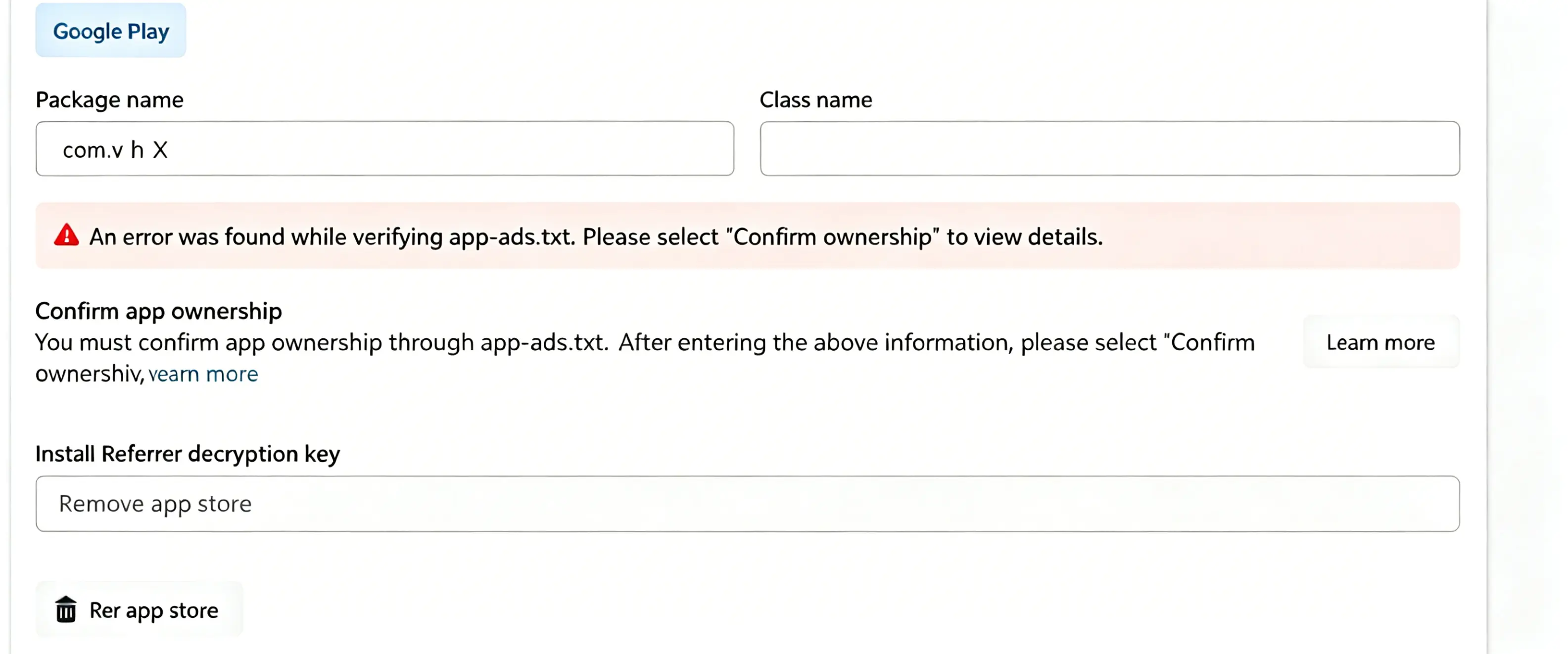
According to official documentation: To improve transparency and security in the mobile advertising ecosystem, Facebook has adopted the IAB Tech Lab’s app-ads.txt standard. Both ad networks and developers are strongly encouraged to participate to help eliminate fraud. The requirement is to add an app-ads.txt file to your official website, containing basic publisher information.
Official guide: https://developers.facebook.com/docs/audience-network/optimization/best-practices/authorized-sellers-app-ads#app-ads-txt
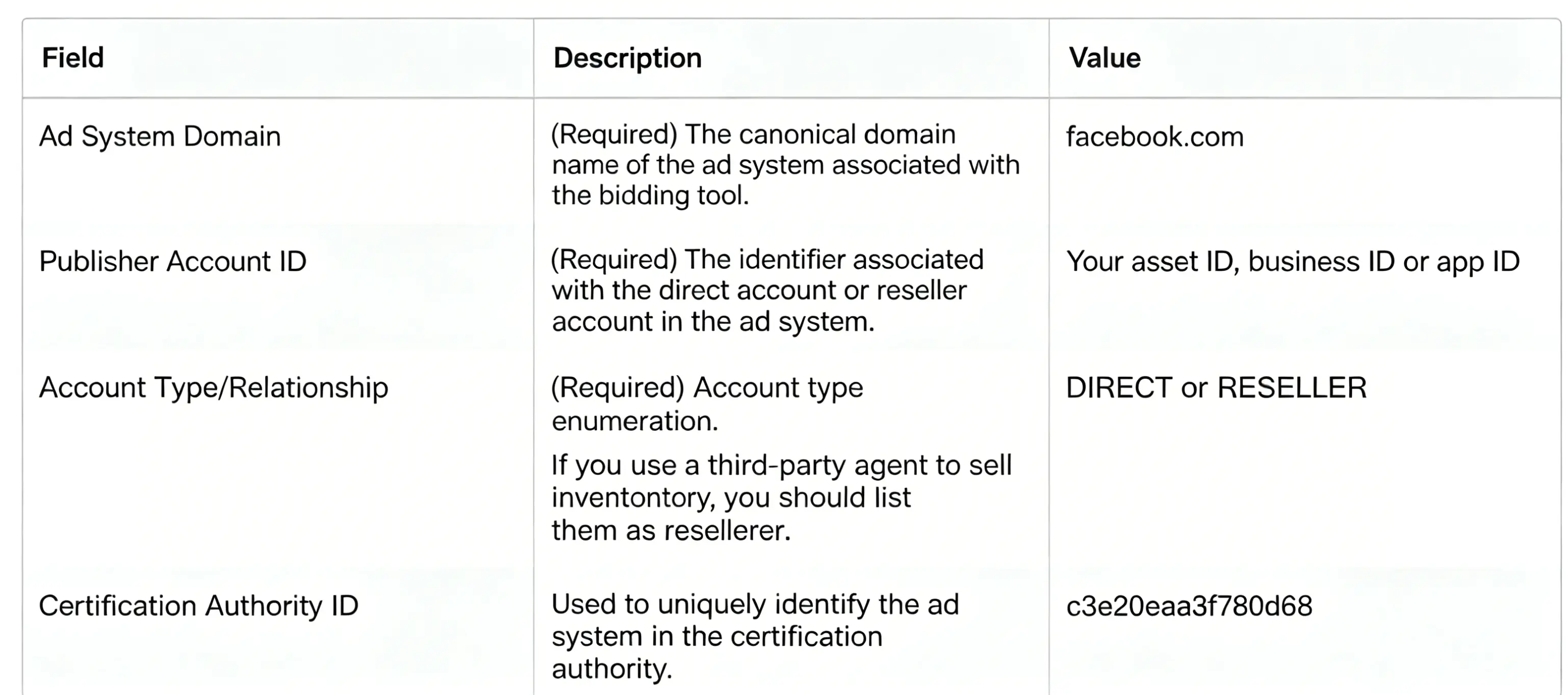
Facebook also lists the most common issues you’ll run into:
- We could not find a valid
app-ads.txtfile. - We could not find your developer website in your app’s store listing (Apple App Store or Google Play).
- Facebook was not found in your
app-ads.txtfile. - We could not find a valid Business Manager ID, asset ID, or app ID in your
app-ads.txtfile. - There is a formatting issue with your
app-ads.txtfile. - Your
robots.txtfile is blocking access to yourapp-ads.txtfile.
Official troubleshooting doc: https://developers.facebook.com/docs/audience-network/optimization/best-practices/troubleshoot-app-ads
From what we can tell:
- The developer website listed in your Google Play/App Store listing must match exactly the one you set in your Facebook app settings.
- The
app-ads.txtfile must be hosted at the root directory of your domain (or at least on a top-level domain), not on a random free subdomain. In other words, you need to use a domain you actually own.
Facebook’s Business Manager verification has already gotten stricter over time. In China, even corporate bank account verification is now required. Overseas, it at least requires your official website domain to match your business email, plus utility bills to confirm your address.
Even with all these hoops, it still doesn’t fully stop bad actors from running grey-hat operations — it just raises the barriers to entry, while also locking out legitimate small-scale advertisers.
DIRECT vs Direct in app-ads.txt
I have already written several articles about app-ads.txt in the past, but let’s do a systematic deep dive into it today.
Take a look at the following two lines:
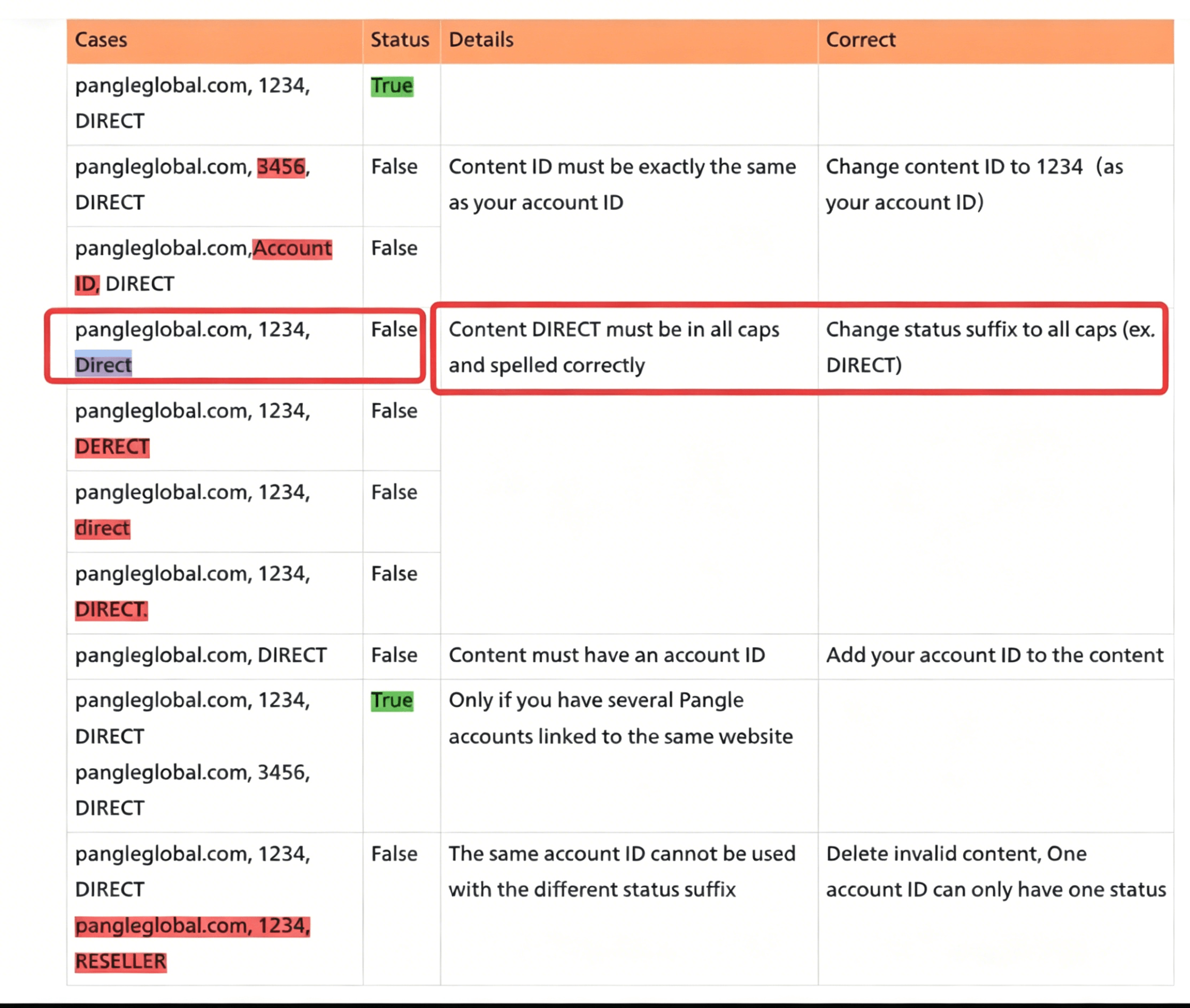
example.com, 1234, Direct
example.com, 1234, DIRECT
- Do you know the difference between them?
- Are they both correct, is one right and one wrong, or are they both incorrect?
If you are 100% sure about the answers to these two questions, you can skip the rest of this article.
Answering the First Question
What is the difference between the two?
In the first line (Direct), only the "D" is capitalized. In the second line (DIRECT), it is in ALL CAPS.
This naturally sparks some curiosity. While the official documentation for the vast majority of ad networks uses DIRECT, there is one specific network whose docs have always used Direct. So, which one is actually correct? Or can they be used interchangeably?
Could it be that my own fixed mindset is keeping me from seeing the full picture here?
A voice inside reminded me not to fall into the trap of empiricism—if you want to know what's truly right, check the official specs.
Answering the Second Question
At least one of these two is correct.
Now, some might push back and say, "Wait, a standard entry is supposed to have four fields, but there are only three here. Is that even valid?"
The answer is yes, it is valid.
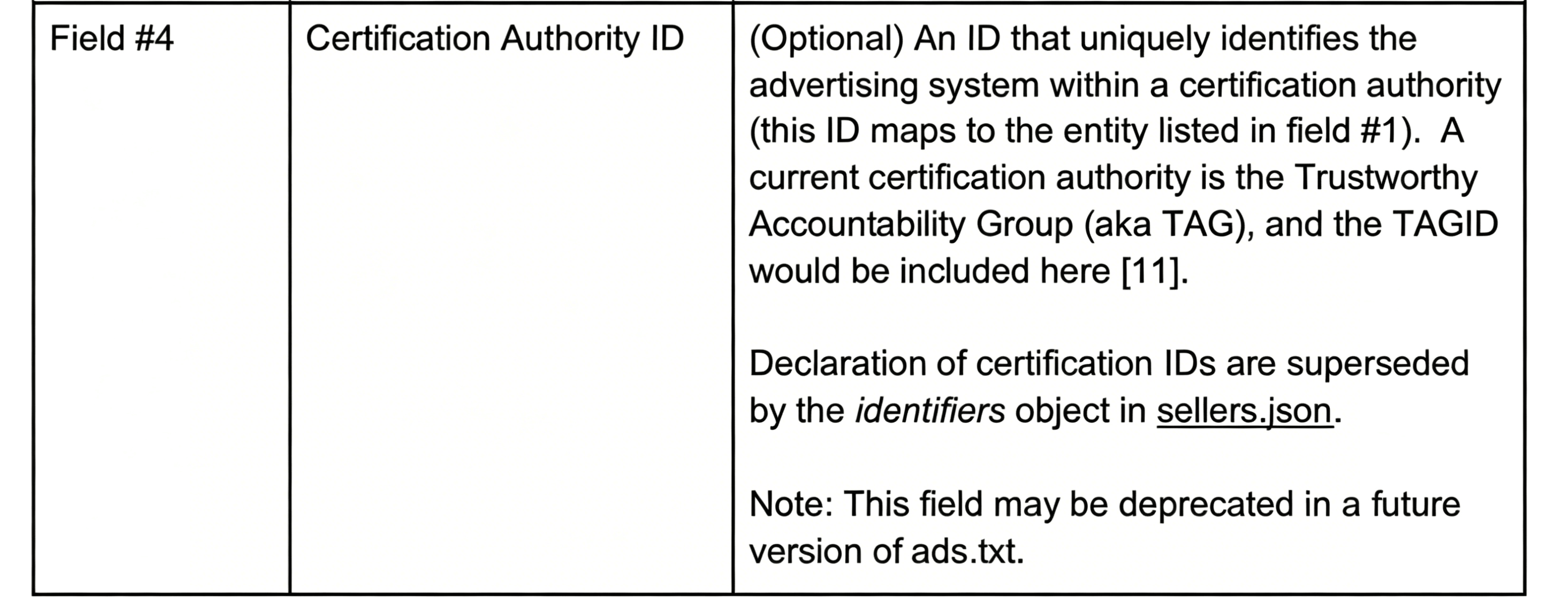
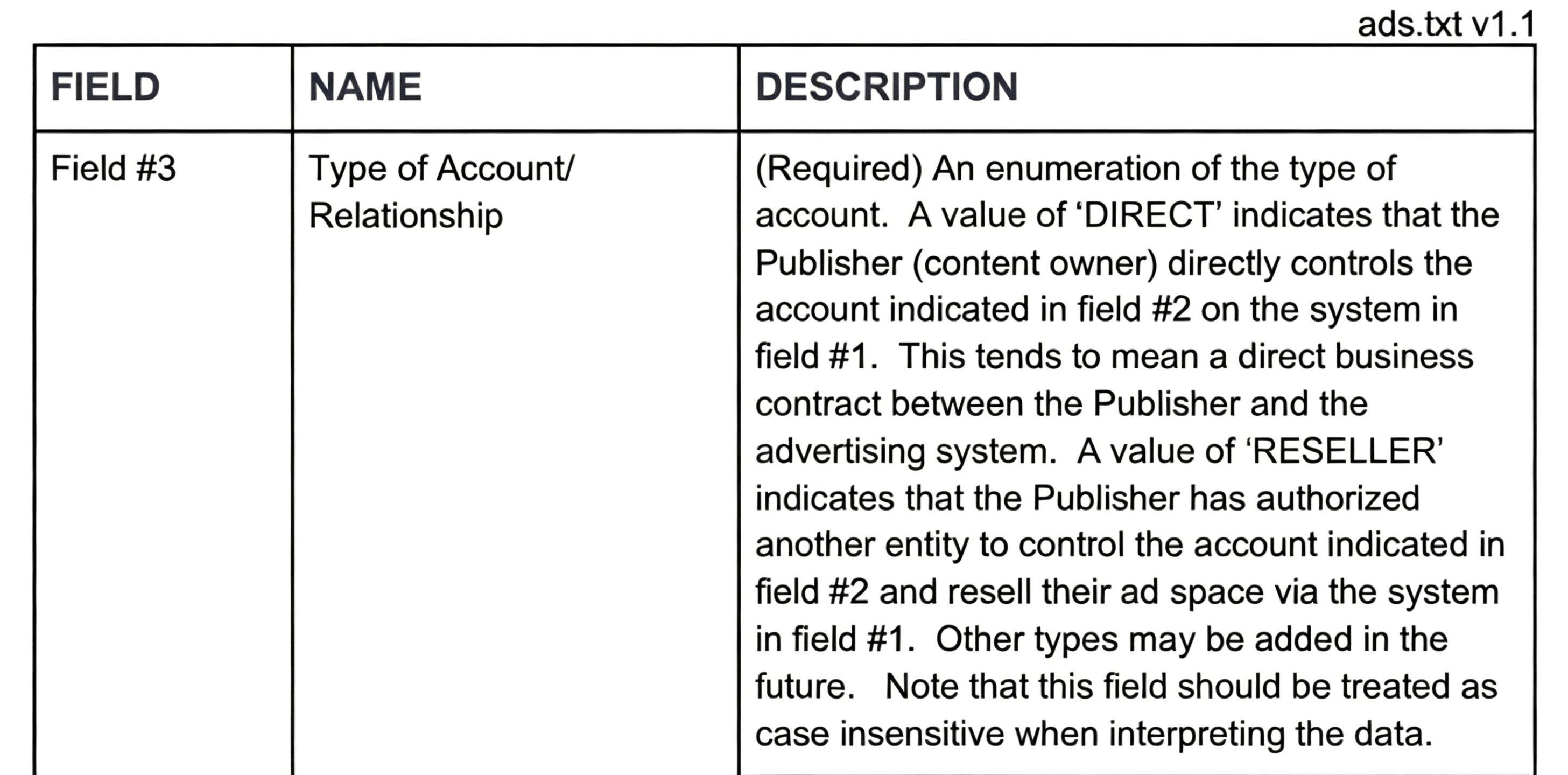
According to the official IAB specification (Version 1.1), it is explicitly stated that the fourth field is entirely optional.
DIRECT vs. Direct: Which One is Right?
The short answer: DIRECT is correct.
- Reason 1: The vast majority of ad networks use
DIRECT. Admittedly, this reason is a bit weak. After all, could this be a case where the truth lies with the minority? - Reason 2: Pangle's documentation explicitly states that ONLY
DIRECTis supported. Omitting it or failing to use all caps will result in an error. - Reason 3: The official IAB spec says so. If you look at the official documentation, the reference values allowed for the third field are strictly limited to
DIRECTorRESELLER. - Reason 4: Testing with AdMob. AdMob allows you to check whether your
app-ads.txtcontent is valid. If you don't believe it, you can run an experiment yourself by changing the casing. Interestingly, after running a test,Directdid not trigger any errors in AdMob.
Recommendation
For ad networks whose official documentation uses Direct, I highly recommend manually adding a duplicate line using DIRECT. The verification rule for app-ads.txt is lenient: as long as at least one line matches correctly, it passes.
example.com, 1234, Direct
example.com, 1234, DIRECT
App-ads.txt (2) – Facebook’s New Policy Changes
Meta (Facebook) has recently rolled out an in-backend notice. To put it simply: starting October 7th, monetization via Facebook will be disabled for apps without a valid linked app-ads.txt file.
Our previous article covered what app-ads.txt is and its components. To recap briefly: app-ads.txt is an industry standard specification. Its impacts are as follows:
- Major brand advertisers only serve ads to apps that implement app-ads.txt. Compliant apps generally see higher eCPM.
- Universal adoption of this standard helps filter out invalid traffic across the ecosystem.
- Non-compliant apps will lose access to Facebook monetization after October 7.
Facebook has been promoting app-ads.txt for quite some time, and the rule is now fully enforced. Below is the implementation guide:
- Compile the required entries from all your ad networks into a single file named app-ads.txt.
- Upload this file to the root directory of your website.
- Enter the file URL (from Step 2) in the marketing website field on Google Play and App Store.
Important Notes
- You can edit the marketing website link on Google Play at any time.
- On App Store, this field must be filled out during app submission; no edits are allowed after the version goes live.
For developers without a dedicated domain
You may host the file on a third-party website or a reliable public platform such as GitHub.
How New Developers Can Start App Monetization with Ads from Scratch
For overseas developers looking to monetize via ads, the unfamiliar ad industry and jargon can be overwhelming. Many start directly with AdMob, unaware of the numerous compliance risks involved. Misst...
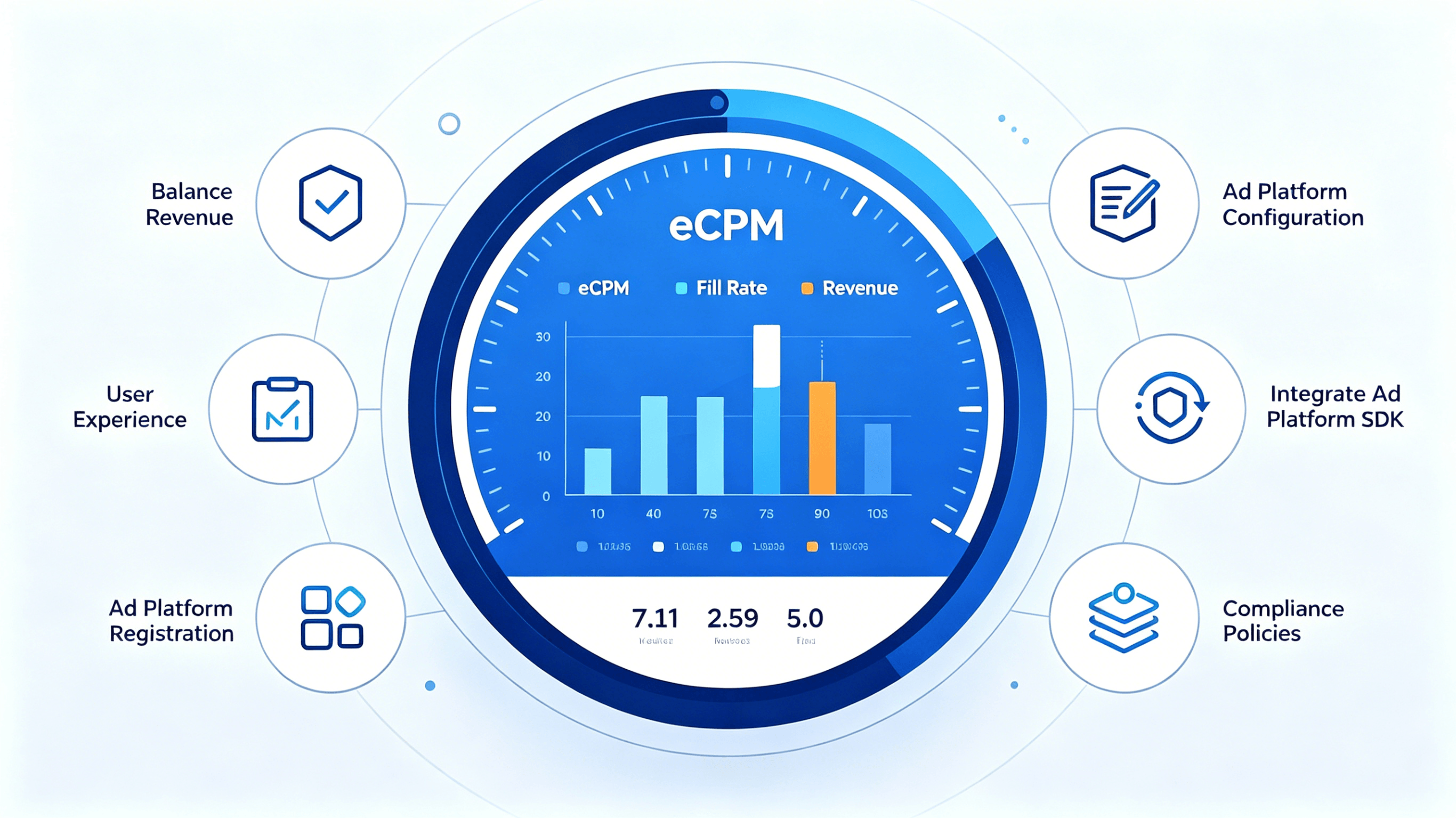
Based on two core principles — fast monetization and risk avoidance — this guide walks you through the ad integration process and key best practices for overseas ad monetization.
Ad Placement Design: Balance Revenue and User Experience
Before monetization, map out potential ad slots within your app. Opt for ad formats tailored to your app category:
- Games: Rewarded video ads are highly recommended. Users receive in-game rewards for watching ads, resulting in strong user acceptance.
- Productivity & Utility Apps: Banner ads or native ads work best, as they cause minimal disruption to the user experience.
Interstitial ads carry a higher risk of policy violations and heavily impact user experience. It is advised to implement them only after you become familiar with ad monetization.
Key Design Tips
Start with a limited number of ad placements. Overcomplicating ad setups early on will make troubleshooting harder. Follow the strategy: launch first, then expand and optimize gradually.
Thoroughly review policies from app stores and ad networks, especially rules on ad monetization from Google Play and App Store, to prevent app removal due to violations.
Refer to official best practice examples offered by platforms like AdMob for proven ad implementation solutions.
Ad Network Registration & Configuration
Major ad networks have distinct registration requirements:
- AppLovin: Your app must be live on an app store to complete registration, and it also has restrictions on app categories.
- Pangle & similar platforms: Generally only accept business accounts and do not support individual developers.
Payment Setup: Overseas ad networks settle payments in US dollars. Prepare an overseas bank account that supports foreign currency transactions.
Ad Unit Configuration Steps
- Create your app and corresponding ad units on the mediation platform.
- Input the IDs of each ad network into your mediation platform.
Two Common Monetization Modes
- Waterfall: A traditional model. Ad networks are ranked by historical eCPM, and ad requests are sent sequentially down the list.
- Bidding: Multiple ad networks submit bids simultaneously. The highest bid wins the impression. This more efficient model has become the industry standard.
Configure app-ads.txt
This file is a critical anti-ad-fraud measure. All overseas ad monetization projects must deploy it, otherwise ad fill rates will suffer. Acting as a whitelist, it tells advertisers which vendors are authorized to sell your ad inventory.
Integrate Ad Network SDKs
Relying solely on AdMob is a common beginner mistake. Insufficient ad competition will lead to low fill rates and reduced revenue.
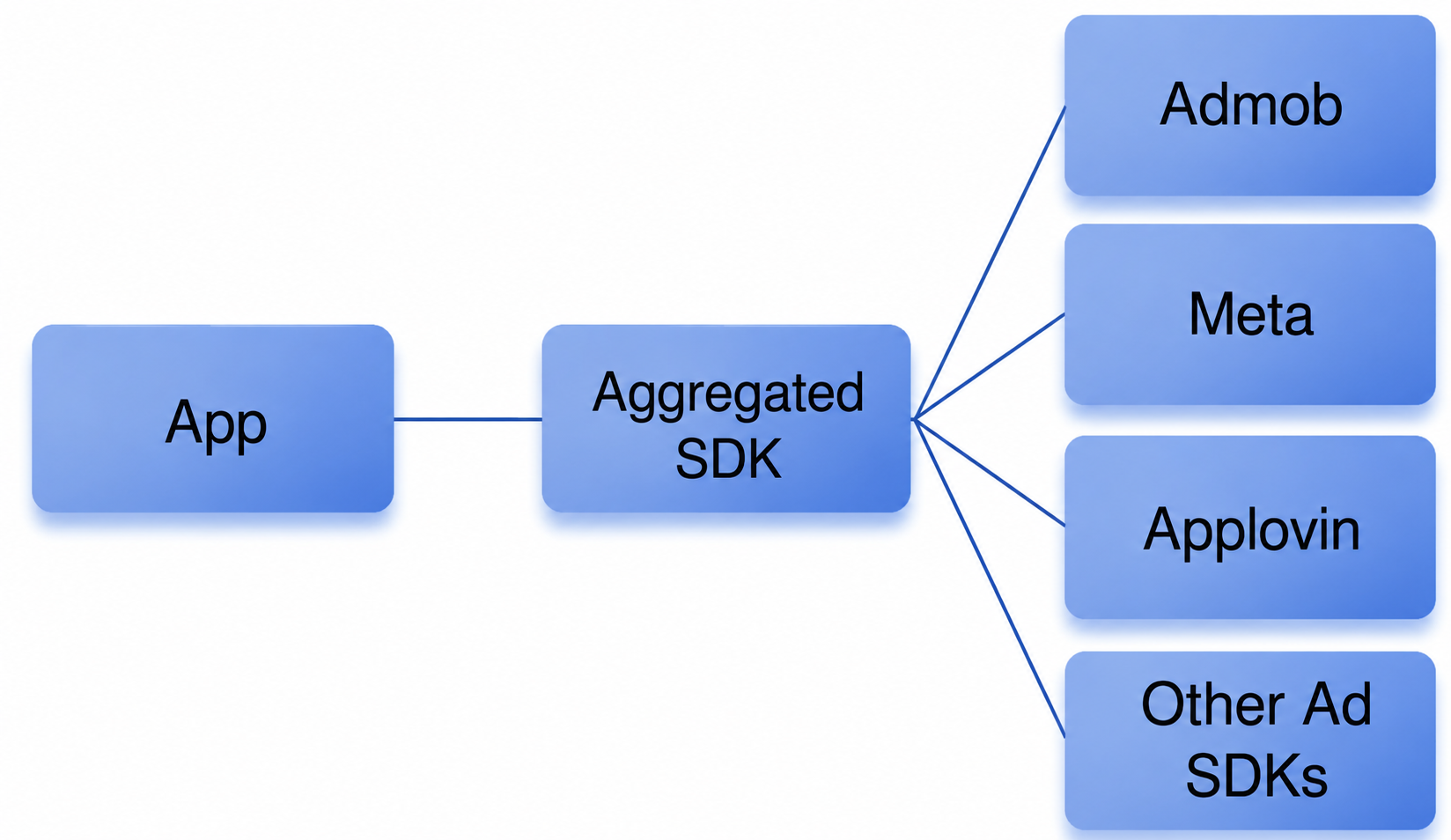
Nowadays, most developers use ad mediation platforms. Acting as a middleman, a mediation platform lets you connect to multiple ad networks via a single integration. Most mainstream mediation tools are free; they generate revenue through their own ad platforms or ad exchanges (ADX).
Advantages of Ad Mediation
- Simplified Integration: Only one SDK needs to be integrated, instead of multiple SDKs from separate ad networks.
- Increased Competition: Built-in bidding mechanisms drive competition among ad networks and lift overall eCPM.
- Cost-Effective: Top mediation platforms are free to use.
Integration Recommendations
- Keep your ad network portfolio to 3–5 reputable partners. Adding more brings marginal revenue gains while increasing app size and operational costs.
- Stick to mainstream platforms, which offer comprehensive documentation and community resources for faster issue resolution.
- Make full use of the test modes and debugging tools provided by mediation platforms.
Compliance & Policies
Overseas ad operations are governed by rules from three main parties:
App Stores (Google Play & App Store)
Both platforms enforce strict privacy policies. Non-compliance will block your app from going live. If your app targets children on Google Play, comply with the Google Play Families Policy.
Regional Privacy Regulations
- GDPR: Privacy law for the European Economic Area and the UK.
- COPPA: Children’s Online Privacy Protection Act (United States).
- CCPA: California Consumer Privacy Act (United States).
- LGPD: General Data Protection Law (Brazil).
Mediation platforms provide detailed compliance guidelines for all above regulations. Follow the documentation closely.
Ad Network Policies
- Ad Display Rules: Pay close attention to regulations regarding interstitial ads and in-feed ads.
- Invalid Traffic Prevention: New AdMob accounts face stricter reviews due to limited historical data.
- Use Test Ads Only: Always use official test ad IDs during development. Do not repeatedly click live ads in your own app, as this will trigger policy violations.
Overseas ad monetization requires continuous testing and optimization. New developers are advised to start simple and scale step by step, while always prioritizing compliance to avoid unnecessary losses.
With well-designed ad placements, proper platform selection, standard integration and ongoing data optimization, even newcomers to the ad industry can build a steadily growing monetization pipeline.